Can't boot: "Failed to isolate default target, freezing"

cotos

Bit poster
After executing "apt-get upgrade" in Terminal, the command was doing what it was supposed to do, but after a while, I come back to see it's progress and it was frozen. I shut it down, using the Virtual Machine Tools, then when I try to start it, it starts normally to this Screen:
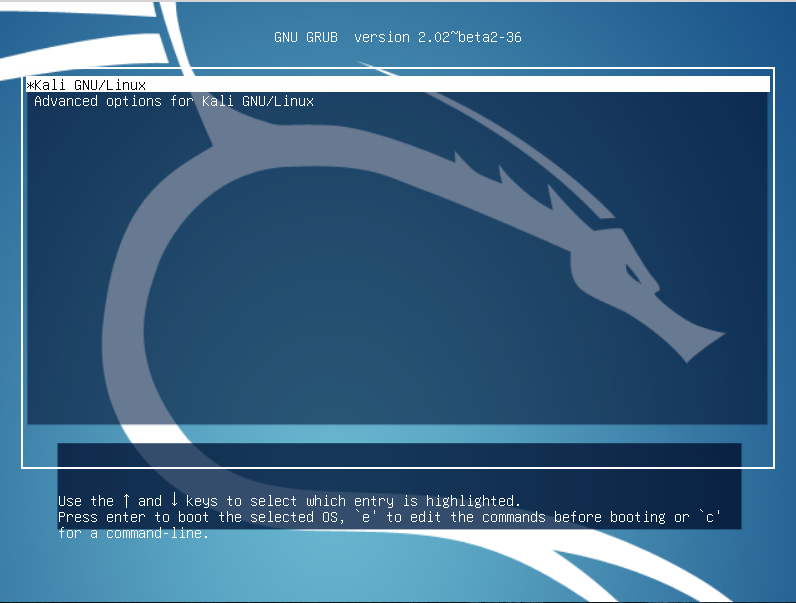
7392557791fde88f004da110aa971be7.png


However, every time I select the first option, this pops up:
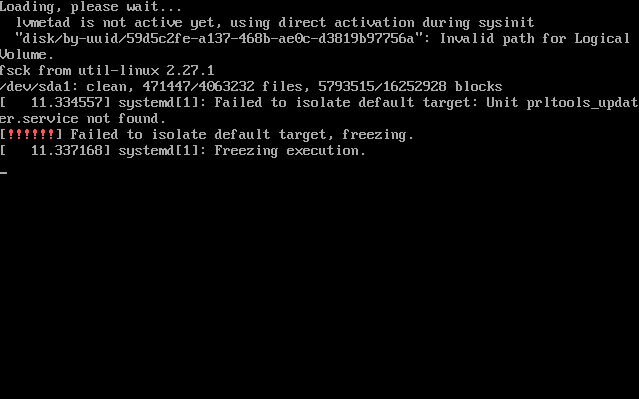
41fa2ca365a50474f0cc88bc14a6f46f.png


I saw it says "Unit prltools_update.service not found", and I thought it could somehow relate to Parallels Tools.
It really bothers me, as I've got loads of files into my System. Is there a way to fix this error? I haven't been able to find any solutions out there on the internet.

Thank you in advance.
 
Hello cotos,
I ran into the same problem today, after upgrading my ubuntu VM to 16.04. Have you found a solution yet?
My screen is slightly different, but I'm 99% sure that this is related to Parallels:

upload_2016-4-22_15-46-56.png
 
Hi MeletisM,

I couldn't find a solution either, so I backed up all my files, and went ahead and re-installed Kali Linux. However, I then faced another problem, it had an error with the Screen or something, then I did some other things. If you want to know what I did, please add me on Skype, so we could chat easier: coto993
 
Ah, lucky you! Had to go into big process into resolving this, ended up giving up Parallels. :p

Glad you were able to fix this issue though. :)

Happy Hacking!
 
Hi,
interesting, just ended up here with similar problem and yes, this happened after Parallels Tools install (manual) and with Ubuntu 16.xx LTS.
Next: Uninstall...

Update: The removal did not fix the issue...still looking for answers.

Regards
 
Last edited:
I select "Remove" after executing `sudo ./install` but the problem still exists even when I try to load system with fallback mode. I guess in my case is because prltoolsd.service did not be removed properly and systemd try to load a nonexistent service then causing the booting failure.
 
Back
Top