MohammedA22
Bit poster

Follow along with the video below to see how to install our site as a web app on your home screen.
Note: This feature may not be available in some browsers.
Hello @MohammedA22, Please share the 9-digit technical report ID of the Virtual Machine when you are getting this error.Hi
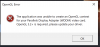
I am trying to run Dune:Spice Wars on Parallels on my Macbook pro, however I get an OpenGL Error message.
Any idea how to work around this?
Thanks in advance!
Hello @Asish@Parallels @Bhargava@ParallelsHello @MohammedA22, Please share the 9-digit technical report ID of the Virtual Machine when you are getting this error.
That worked for me, too!Since April 2022, to force Direct X you need to set a launch option for the game.
Right click on the game > Properties > General and from the Launch options field add "hlbootdx.dat" without the quotes.
Now the game will start using Direct X not OpenGL and it will run pretty good

 I've requested a refund but I'm gonna keep my eyes open for a solution because I really want to play that game!