Cannot boot Win10 Bootcamp from Parallels 14 for Mac

BenS10

Bit poster
Hi all,
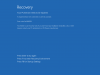
I have an issue with a newly installed Parallels 14 for Mac and an existing Bootcamp partition running Windows 10. When booting from Bootcamp natively, the OS starts ok, but when booting in Parallels I get an error (see attached screenshot) before the VM shuts down after 30 seconds. I've tried deleting and recreating the VM and adjusting allocations for CPU, memory and graphics.
Under Configuration>Hard Disk>Advanced Settings>Partitions I have an EFI volume of 0.2GB with system name of disk1s1 (suspect recovery volume) and an NTFS volume of 468GB with system name of disk1s3. Disk1s3 is definitely the bootcamp volume and it is selected in the partitions list.

Help greatly appreciated.
 

Attachments

  • Screen Shot 2018-10-26 at 9.02.36 pm.png
    Screen Shot 2018-10-26 at 9.02.36 pm.png
    111.6 KB · Views: 36
Hi all,
I have an issue with a newly installed Parallels 14 for Mac and an existing Bootcamp partition running Windows 10. When booting from Bootcamp natively, the OS starts ok, but when booting in Parallels I get an error (see attached screenshot) before the VM shuts down after 30 seconds. I've tried deleting and recreating the VM and adjusting allocations for CPU, memory and graphics.
Under Configuration>Hard Disk>Advanced Settings>Partitions I have an EFI volume of 0.2GB with system name of disk1s1 (suspect recovery volume) and an NTFS volume of 468GB with system name of disk1s3. Disk1s3 is definitely the bootcamp volume and it is selected in the partitions list.

Help greatly appreciated.
Hi @BenS10, please check out the instructions mentioned below:
1.Open the virtual machine configuration and on the General tab change its type from Windows 10 to macOS.
2.Then switch to the Hardware tab and select Mouse & Keyboard from the list.
3.Change Mouse option to 'Optimize for Games'.
4.Close the configuration window and start the virtual machine.
5.If the steps above do not resolve the issue, remove the existing Boot Camp virtual machine and create a new, then repeat steps.
 
This ALMOST works!! I can see the Windows logo and VM appears to start booting with a Windows screen saying "Getting Devices Ready" .This loads to 33% before the VM stops and I get a popup from Parallels indicating there's been a critical error. Anything else I can try before blowing away the partition and starting again?
 

Attachments

  • Screen Shot 2018-10-27 at 3.34.48 pm.png
    Screen Shot 2018-10-27 at 3.34.48 pm.png
    332 KB · Views: 17
This ALMOST works!! I can see the Windows logo and VM appears to start booting with a Windows screen saying "Getting Devices Ready" .This loads to 33% before the VM stops and I get a popup from Parallels indicating there's been a critical error. Anything else I can try before blowing away the partition and starting again?
Hi @BenS10, can you please reproduce the issue and reply us with a Technical Data ID collected from the terminal command: prlsrvctl problem-report --send ?
 
Hi again, firstly I apologise for not getting on this sooner. Problem ID has been reported as 282800443.
 
Hi team,
Just checking in on this problem. As far as i know I have received no communication regarding a fix for this yet, and I'm still experiencing the issue.
 
Hello,
Any progress on this? I have a ton of stuff in Bootcamp, so don't want to reinstall, but I can only access it using rebooting, not the reason I bought Parallels!
Thanks
 
Back
Top