
WolfgangS16
Bit poster
I just set up a Mojave VM to keep my "old" 32-bit Apps running. In the configurations I can set the graphic memory up to 2 GB, but in the VM only 256 MB is shown. This affects the installation of MS Office 2011:Mac and software that needs more graphic memory (Civ V and others) won't start up.
I already tried to de-install and re-install Parallels Tools like described on the support pages, but that didn't work.
Maybe the Parallels driver doesn't support my Radeon Pro 580 8GB?
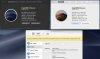
My machine specs are in the screenshot:
Darkmode=VM, Lightmode=Host, Config-Box (video set to 512 MB)
I already tried to de-install and re-install Parallels Tools like described on the support pages, but that didn't work.
Maybe the Parallels driver doesn't support my Radeon Pro 580 8GB?
My machine specs are in the screenshot:
Darkmode=VM, Lightmode=Host, Config-Box (video set to 512 MB)