
Install the app
How to install the app on iOS
Follow along with the video below to see how to install our site as a web app on your home screen.
Note: This feature may not be available in some browsers.
You are using an out of date browser. It may not display this or other websites correctly.
You should upgrade or use an alternative browser.
You should upgrade or use an alternative browser.
Cannot activate parallels toolbox
- Thread starter DarrenG1
- Start date

Sergeyt
Parallels Developers
Seems this problem happens when you have a subscription for two and more hosts.
And after successful activation on the first Mac with the first key, you try to activate the second Mac with the second key from the bunch.
Try to activate the second Mac with the first key from the bunch.
It should help.
And after successful activation on the first Mac with the first key, you try to activate the second Mac with the second key from the bunch.
Try to activate the second Mac with the first key from the bunch.
It should help.
Last edited:
ComputerD1
Bit poster
I am having an issue where I got a new iMac and transferred my parallels license to this computer, but the parallels toolbox won't activate because it says I have already activated it on three prior machines. I don't use those prior machines anymore.
JIM SYLVESTER
Bit poster
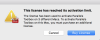
Hello @JIM SYLVESTER We have made the necessary change, please try to activate now. Thanks, Shathish
yes, it worked. Thank you.
You're welcome. Please get back to us for any further queries. Thanks!
I am having an issue where I got a new iMac and transferred my parallels license to this computer, but the parallels toolbox won't activate because it says I have already activated it on three prior machines. I don't use those prior machines anymore.
We have made the necessary change, please try to activate now. Thanks!
We have made the necessary change, try to activate now.I'm having the same issue. On my new MacBook Parallels Desktop is activated, but Toolbox is not. it says I have already activated it on three prior machines.
If you face any issues, feel free to reach us anytime for support.Thanks!
John_Fallas
Bit poster
Hi,
Recently updated Parallels Desktop 13 to 13.1.0 (43108), but when I try to activate P Toolbox, it says 'Failed to save the internal information to the hard disk.'
Any help would be appreciated.
Thanks
Recently updated Parallels Desktop 13 to 13.1.0 (43108), but when I try to activate P Toolbox, it says 'Failed to save the internal information to the hard disk.'
Any help would be appreciated.
Thanks
Alfena@Parallels
Pro
Hello @John_Fallas ,
Please make sure you have installed all the updates of Parallels Toolbox, then click on the Parallels Toolbox icon in the Mac menu bar, then on the cogwheel icon in the upper right corner within the application interface, select 'About Parallels Toolbox' from the menu that appears and click on 'Sign Out' in the next screen. Then, within the Parallels Toolbox wizard, sign into your Parallels account , click on 'I have a key' and apply your Parallels Desktop 13 license in the following screen and check if it works. Thanks
Please make sure you have installed all the updates of Parallels Toolbox, then click on the Parallels Toolbox icon in the Mac menu bar, then on the cogwheel icon in the upper right corner within the application interface, select 'About Parallels Toolbox' from the menu that appears and click on 'Sign Out' in the next screen. Then, within the Parallels Toolbox wizard, sign into your Parallels account , click on 'I have a key' and apply your Parallels Desktop 13 license in the following screen and check if it works. Thanks
John_Fallas
Bit poster
Hi, thanks for the reply, but I have tried several times and still get the same message.
Hi, thanks for the reply, but I have tried several times and still get the same message.
Please uninstall and reinstall Parallels Toolbox.
1.To uninstall Parallels Toolbox, quit the application.
Open Finder > Applications > select the Parallels Toolbox folder and application and move them to Trash.To know more, please refer this article
2.To reinstall Parallels Toolbox for Mac, please follow as suggested at http://kb.parallels.com/123931 and check if this works. Thanks!
John_Fallas
Bit poster
Thanks for the tip and for your patience. Just for the record, besides trashing the PT application itself I had to uninstall all related files (plist etc.) using a 3rd-party uninstaller. After reinstalling PT, the registration process worked.
Alfena@Parallels
Pro
Hello @John_Fallas , glad to know it works.

S
Sathiya@Parallels
Hi ThomasR17. Please move the Parallels Toolbox from the 'Applications' folder to 'Trash'. Then refer this article to install Parallels Toolbox and check if it helps.I am having similar issue, please see screenshot
View attachment 14103
I can successfully login to Parallels Desktop with the same credentials, so what can be wrong here?