
On a newly purchased MacBook Pro 14" (Sonoma, M3 Max), I installed Parallels Desktop 19 and created a Ubuntu 22.04.2 ARM64 VM.
I can't access any of my Mac folders from within the Ubuntu VM.
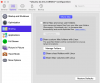
I've tried Configuration/Options/Sharing with "Mirror Mac and Linux user folders" and/or "Share custom Mac folders with Linux" checked but nothing seems to work. Curiously though, in the "+ Other Locations" tab in the Files app, I can see other computers and file servers on my local area network. But I can't see the files on my own Mac!
As a side note, if you go to the Parallels menu bar and select "Actions / Shut Down" - nothing happens. I have to click the icons in the top right of the Ubuntu windows and select Power Off / Log Out and then Power Off.. to shut the VM down.
I also have a Windows 11 VM and there are no issues - I can see my Mac folders.
Any help would be appreciated.
I can't access any of my Mac folders from within the Ubuntu VM.
I've tried Configuration/Options/Sharing with "Mirror Mac and Linux user folders" and/or "Share custom Mac folders with Linux" checked but nothing seems to work. Curiously though, in the "+ Other Locations" tab in the Files app, I can see other computers and file servers on my local area network. But I can't see the files on my own Mac!
As a side note, if you go to the Parallels menu bar and select "Actions / Shut Down" - nothing happens. I have to click the icons in the top right of the Ubuntu windows and select Power Off / Log Out and then Power Off.. to shut the VM down.
I also have a Windows 11 VM and there are no issues - I can see my Mac folders.
Any help would be appreciated.