

feinberj
Bit poster
I would like to be able to use the built-in Screen Recorder in Windows 10, part of the Xbox gaming center (I press Windows-G to launch). I'm running the latest version of Parallels (v18.0.2) and an updated version of Windows 10 on a 2010 Mac Pro with Big Sur and a Vega 64 video card.
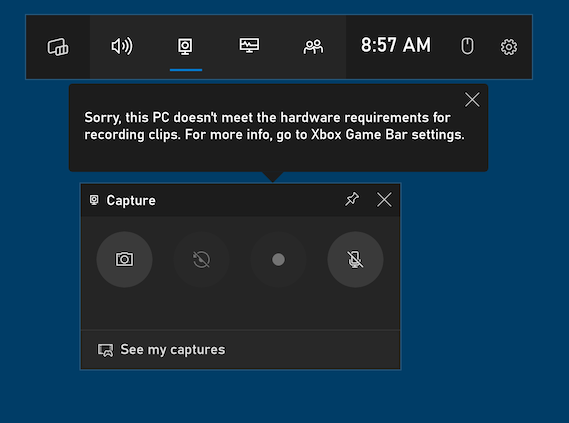
When I press the record button I get a message "Sorry, this PC doesn't meet the hardware requirements for recording clips. For more info, go to Xbox Game Bar settings." (see image at the bottom of this post)
This Microsoft xbox support URL says the following:
https://support.xbox.com/en-US/help...ialize/pc-hardware-requirements-for-capturing
To capture game clips, however, your PC's video card must support one of these encoders:
Intel Quick Sync H.264 or later
NVIDIA NVENC
AMD VCE
Does anyone have a suggestion for how I might update the settings for my Parallels virtual machine so that it will support the built-in screen recording function?
Thanks!
John Feinberg
Montclair, NJ
When I press the record button I get a message "Sorry, this PC doesn't meet the hardware requirements for recording clips. For more info, go to Xbox Game Bar settings." (see image at the bottom of this post)
This Microsoft xbox support URL says the following:
https://support.xbox.com/en-US/help...ialize/pc-hardware-requirements-for-capturing
To capture game clips, however, your PC's video card must support one of these encoders:
Intel Quick Sync H.264 or later
NVIDIA NVENC
AMD VCE
Does anyone have a suggestion for how I might update the settings for my Parallels virtual machine so that it will support the built-in screen recording function?
Thanks!
John Feinberg
Montclair, NJ