Build 1940 of Parallels Desktop for Mac

dmainzman said:
Yeah, when will we see 3D support in a beta build? EVER?
You guys promised us potential 3D support a long time ago.

Bear in mind, vmware still doesnt have this... and thats been around for many many years.
 
Keypad Enter key behavior in newest build

I had to unistall the previous build and go back to 1848 because that's the only one where the Keypad Enter key functions as it should rather than as an ALT key. Can anyone test the Keyapd Enter Key on their Apple keyboard and see if it (and the other keys) work correctly?

Thanks

Marc
 
Re: Keypad Behavior in latest build

71Maple said:
I had to unistall the previous build and go back to 1848 because that's the only one where the Keypad Enter key functions as it should rather than as an ALT key. Can anyone test the Keyapd Enter Key on their Apple keyboard and see if it (and the other keys) work correctly?

Thanks

Marc

Bizarre. I *never* use the keypad (wish I could saw it off & move my mouse 3" closer to the real part of the keyboard :rolleyes: ), so I can't compare with past builds, but yes, on this latest (1940) build, most of the keys on the keypad are psychotic. More specifically, the ENTER key has delusions of ALT-hood, while the number keys themselves are enthralled by the CLEAR key - pressing the CLEAR key toggles whether the number keys work or not (initially not). The "=" key seems to have usurped the ENTER function. But the rest of the rightmost colum (*-+) seem their normal selves. Oh, all of this is on my Bluetooth Apple keyboard, connected to my 15" MBP, with Win2K as the guest OS.
 
Last edited:
swilcox said:
I know there are lots of things on the development team's plate, but this is the one that concerns me :)
I don't suppose this version allows us Garmin Edge owners to use our devices, does it?

I randomly followed this matter as it doesn't concern me but I'm asking myself: is really the problem in PD? Isn't maybe in the (often) aknowledged IOUSBFamily kext bugs? Have you tried to change it with an older version available on the developer.apple.com site? I did it because I had unexpected hang ups with my external modem and the problem disappeared. Od course, its hazardous to place a kext developed for an older version of Mac OS into the most recent...
 
OS X Reboot May Be Required!

I just upgraded to Build 1940 and (after an hour of diagnostics) discovered that I had to reboot OS X to get the networking going.

I upgraded my 15" MBP (running latest (10.4.8) OS X) from the second edition of RC2 (Build 1922, I think it was) to 1940. Dealt with the distraction of being asked to register again (which I did) and then being taken to an account status page that showed no evidence of confirming my registration, but instead just gave a list of *trial* versions that I could download. Did that re-entry of my registration info not work, with my registration now screwed up, or what? Fey. So just closed that window and went back to the real topic.

Started Parallels, booted my Win2K guest OS, got a nice reminder to install the new Tools, which I did, and then rebooted the guest OS, as directed (and hey, it's Windows, so *of course* there's at least one reboot involved). Then everything's good, except ... no networking. Ugh. Did Windows need another round or two of reboot in order to adapt to something so radical as a minor driver update? No help. Tried "ipconfig /all" at a cmd prompt - DHCP was working fine, and I could even ping my host OS, but nothing further. Starting to look like some Bad Thing® has happened ... that has completely disabled the accommodate-my-employer-by-running-Windows part of my machine (double ugh). Checked the fora, etc - nothing except the general networking debugging suggestion to try other modes, so I changed to host-only networking (after yet another Windows shutdown :mad: ). Only at this point did I get the first error message of any kind, saying that Parallels couldn't even find the host networking adapter (en2?), and to maybe try rebooting OS X. Ok, did that, and everything now seems fine (whew!).

Now, just to be clear - I don't begrudge Parallels a need to reboot OS X once (after all, it's not like we're installing a new game of solitaire here!). But I don't recall having needed to do so on any past upgrades (going back to Beta 5). So a warning/suggestion/tip up front sure would have helped ... especially since OS X doesn't share Windows's penchant for needing reboots ("Warning! Windows has detected that your mouse has moved. Click "OK" to reboot.").
 
USB getting worse

on earlier builds I could connect to my WindowsCE device via USB and parallels, now I can hardly connect to anything. Still get the "wait 5-10 seconds,etc.." even through it has nothing to do with OSX. Going back to Boot Camp.

Installing 1940 casued a couple of Kernal panics on OSX tring to connect to USB devices.

so overall, not very happy
 
"Bizarre. I *never* use the keypad (wish I could saw it off & move my mouse 3" closer to the real part of the keyboard)"

Try a Happy Hacking Keyboard Lite. You'll never go back.
 
I am also still experiencing a USB problem with an HID based USB Pulse sensor.

About 2/3 of the data reports never make it - lots of data being lost.

The Windows driver does blocking reads - and I suspect the pass through is not handling this correctly.

-- Harald
 
Kernel Panic / shutdowns with 1940 build under Ubuntu

I am getting abrupt shutdowns of my MacBook Pro under Ubuntu. This was bad under the 1922 build and still seems to be under the 1940 build. It looks like it has something to do with the video. I am running X windows at 1280 x 800, not sure if that plays into it. For example I can open a terminal window, maximize it and then minimize it and the computer shuts down with a "Previous Shutdown Cause: 3" from the Kernel.

Does anybody have any workaraounds to suggest?
 
Upgrade OK So Far

Just upgraded my Parallels for MAC and Windows XP is humming along good as ever. I don't know why Parallels pops up the registration request in a new browser window when it clearly identifies your system as uprading. I just closed the browser window. Started up XP, then ran the Install Tools again. Everything smooth. All programs running before running still. :) VG PS: Running on a MacBook with 1GB Memory.
 
A couple kernel panics here. It seems to be USB related, in that I get a heap of Wait 5-10 seconds and USB should connect messages appearing, and a couple of times that has been followed by a kernel panic. It seems to be especially sensitive to having devices added while Windows is running. If they are connected when Parallels starts it all seems pretty stable.

So all good except for the kernel panics! This is the real priority for me, I'm less interested in whether 3D works or anything else like that, sure it would be nice, but it's got to be stable, first and foremost.

MBP, 2GB RAM, OS 1.4.8
 
Noticed problems with 1940.
1. Sometime RH4 Linux takes 100% while idle. I did top in Linux and is it idle and Mac shows 70 - 110% on my MBP.
2. Also windows XP after suspend become unresponsive for some times. But it does not lockup. It is just that you can't do anything (Select. open any windows). How can I att image of the Top and Mac Activity Monitor running side by side showing the 100% cpu problem
 
Build 1940 hangs on startup

I tried build 1940 on my new iMac (20" C2D 2G 256MB VRAM) and got the same result as with previous builds: If I start either the Parallels or ImageTool apps a process gets created but immediately hangs and the app's UI never appears. Activity Monitor says the process has one thread and 0% cpu time. I am unable to kill the process so I have to force the iMac to shutdown by holding down the power button. When sampled I get the following call graph from Parallels:

Analysis of sampling pid 347 every 10.000000 milliseconds
Call graph:
100 Thread_0f07
100 0x6735
100 0x681a
100 0x4f097
100 0xf9069
100 0x1f3397
100 CDeviceList::CDeviceList[in-charge]()
100 open
100 open
 
Network issues continue with 1940

The last time I could access my companies networked servers was build 1862. I had hoped that 1940 would finally fix this major annoyance (which has been reported in several threads).
My only workaround is to use a cloned image of 1848 to enter the network. Have tried numerous suggestions found within the forum to no avail.
Here we are 6 builds later with no resolution!
Parallels Team.... this should be part of the core competence within the VM software, when will you take (find?) time to resolve this?:confused:
 
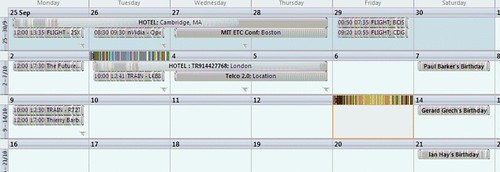
Office 2007 TR2 wierd graphics

I upgraded to 1940 last night and when I launched Office this morning under XP and went to my calendar all the appointments are very strangely corrupted, you can see what I mean here as hard to explain.

268388410_d76e35d386.jpg


Anyone else encountered this? I'm assuming it's something to do with the new tools it made me install ?
 
Thanks You Parallels

Hi,
quick note to say thanks to the team for the 1940 version. I've had a number of problems with parallels in the past to do with host only networking, which involved OS/X and Windows re-installs. However, all is sorted and 1940 buzzes along quite happily.

The thanks to the team are for putting the new doc icons together. Its a simple change, but the abiltity to see which VM is running Linux and which Windows is a massive benefit when running more than one VM at the same time, so thanks again.

Paul
:)
 
scotymac said:
The last time I could access my companies networked servers was build 1862. I had hoped that 1940 would finally fix this major annoyance (which has been reported in several threads).
My only workaround is to use a cloned image of 1848 to enter the network. Have tried numerous suggestions found within the forum to no avail.
Here we are 6 builds later with no resolution!
Parallels Team.... this should be part of the core competence within the VM software, when will you take (find?) time to resolve this?:confused:

scotymac
was this solved? i'm running 1848 and vpn into my company net...i can't afford to upgrade and loose this capability.

max
 
Back
Top