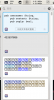
BUG: Clipboard manager has ??? on preview, when copy from VSCode

lineveS

Bit poster
How to reproduce:

1. download vscode
2. use vscode to open any project on github , for example https://github.com/NodeBB/NodeBB (maybe optional? You can try use VSCode open any code file with code highlighting)
3. copy any text in vscode
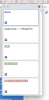
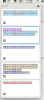
4. see clipboard manager have ? in history
 

Attachments

  • 2P7jwBJj.png
    2P7jwBJj.png
    89.3 KB · Views: 12
How to reproduce:

1. download vscode
2. use vscode to open any project on github , for example https://github.com/NodeBB/NodeBB (maybe optional? You can try use VSCode open any code file with code highlighting)
3. copy any text in vscode
4. see clipboard manager have ? in history


Hello lineveS,

To aid us in troubleshooting this further, please collect a technical report while the issue is being reproduced (click the Parallels icon > Help > Send technical data > check "Attach screenshots..." > press Send Report) and send the report's 9-digit ID in reply to this post.
 
Hi @Adeboye Adeotan , the digit is 451675723

The bug still presist, for about half a year! Do you use VSCode for coding?

Hi lineveS,

Thank you for your patience.
Please be informed that we have run tests on this issue on different Mac computers but have been unable to reproduce it.

We observed that your host Mac's operating system is currently macOS 14.2.1

Kindly update to the latest version of MacOS Sonoma and attempt to reproduce this issue.
 
Hi lineveS,

Please note that a new version of Parallels Toolbox has been released (6.6.2).

Additionally, Kindly update your application by following the steps provided below:
- Click the Parallels Toolbox icon (See screenshot) > Settings (Gear) icon > Check for updates
upload_2024-2-29_18-17-28-png.22091


Please collect an additional Technical report for our investigation. This time from the Toolbox application itself (see screenshot).
- To do this, reproduce the issue and collect a technical report (click the Parallels Toolbox icon > Settings (Gear) icon > Help > Send technical data > check "Attach screenshots..." > press Send Report) and send the report's 9-digit ID in reply to this post.
 
Last edited:
Hi Adeboye, the latest code is 452697086

Can you reproduce it using VSCode? Be sure to copy code with code highlighting. I also find the app icon is wrong, it is not VSCode.
 

Attachments

  • 截屏2024-03-01 13.36.36.png
    截屏2024-03-01 13.36.36.png
    12.7 KB · Views: 5
Hi Adeboye, the latest code is 452697086

Can you reproduce it using VSCode? Be sure to copy code with code highlighting. I also find the app icon is wrong, it is not VSCode.

Thank you for the provided data Lineve.

Indeed, it appears to require some more in-depth investigation so we have referred this issue to our Development Team.

As soon as we have an update regarding this issue, we will reach out to you.

One last question please. When this issue occurs, what happens if you copy the code from the clipboard preview and attempt to paste it into Vscode or a different application? Does it paste the actual code or the "?????" characters?
 
The pasted content is normal. So this is only a rendering issue on the app.

Sometimes I guess the content by its length, and dbclick to paste it as usual.
 
Back
Top