
Hi Everyone,
I have a 500gb SSD that I use for Windows 10 boot and Apps install. I also have a second 4TB HDD that I use for storage. I moved all the typical folders over to this drive (Documents, Downloads, Music, Pictures, Steam, etc.) The Bootcamp drive starts fine in Parallels, but it always gives me an error about the storage drive not being able to mount. I've tried going into the VM's settings, and it will only allow me to select a virtual drive as a second drive, not an actual physical internal hard drive.
Starting this Bootcamp disk in Parallels is virtually (pun intended) useless without the second drive mounting, as I can't save anything. I have a serial for v15, but thought downloading a trial for v18 would possibly fix this problem, but it hasn't.
MacPro5,1 running Big Sur (11.6.8) with OpenCore EFI. I can't see how that would cause a problem though.
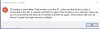
I have a 500gb SSD that I use for Windows 10 boot and Apps install. I also have a second 4TB HDD that I use for storage. I moved all the typical folders over to this drive (Documents, Downloads, Music, Pictures, Steam, etc.) The Bootcamp drive starts fine in Parallels, but it always gives me an error about the storage drive not being able to mount. I've tried going into the VM's settings, and it will only allow me to select a virtual drive as a second drive, not an actual physical internal hard drive.
Starting this Bootcamp disk in Parallels is virtually (pun intended) useless without the second drive mounting, as I can't save anything. I have a serial for v15, but thought downloading a trial for v18 would possibly fix this problem, but it hasn't.
MacPro5,1 running Big Sur (11.6.8) with OpenCore EFI. I can't see how that would cause a problem though.