Hello!
I've installed Windows 11 Pro on Parallels 20 and wanted to access my iPhone 16 from Windows 11 with the Phone Link app.
For this purpose I've enabled bluetooth in the VM configuration. (Configuration / Hardware / USB & Bluetooth: [X] Share Bluetooth devices with Windows)
Then I enable phone link in the settings and opened it and tried to pair the Windows 11 with my iPhone 16 but I wasn't working.
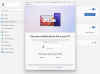
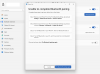
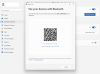
As you can see in the attached screen captures I was not able to make it work (see attached files Phone_Link_1.png, Phone_Link_2.png, Phone_Link_3.png
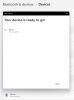
However as a bluetooth device I was able to pair the iPhone 16 with the Windows 11. (see the attached iPhone_pairing_success.png image) Strangely the bluetooth name for the operating system on the iPhone 16 is not the Windows one but what is it for the MacOS.
Also this experimenting with Bluetooth finally freezed my Windows 11 start button and after even a restart the start button and the search field didn't work and I had to reinstall Windows 11 again.
My question is that is there somebody who was able to successfully make Phone Link work on Windows 11 and Parallels?
Thanks. Regards, J.
I've installed Windows 11 Pro on Parallels 20 and wanted to access my iPhone 16 from Windows 11 with the Phone Link app.
For this purpose I've enabled bluetooth in the VM configuration. (Configuration / Hardware / USB & Bluetooth: [X] Share Bluetooth devices with Windows)
Then I enable phone link in the settings and opened it and tried to pair the Windows 11 with my iPhone 16 but I wasn't working.
As you can see in the attached screen captures I was not able to make it work (see attached files Phone_Link_1.png, Phone_Link_2.png, Phone_Link_3.png
However as a bluetooth device I was able to pair the iPhone 16 with the Windows 11. (see the attached iPhone_pairing_success.png image) Strangely the bluetooth name for the operating system on the iPhone 16 is not the Windows one but what is it for the MacOS.
Also this experimenting with Bluetooth finally freezed my Windows 11 start button and after even a restart the start button and the search field didn't work and I had to reinstall Windows 11 again.
My question is that is there somebody who was able to successfully make Phone Link work on Windows 11 and Parallels?
Thanks. Regards, J.