
Install the app
How to install the app on iOS
Follow along with the video below to see how to install our site as a web app on your home screen.
Note: This feature may not be available in some browsers.
You are using an out of date browser. It may not display this or other websites correctly.
You should upgrade or use an alternative browser.
You should upgrade or use an alternative browser.
Black screen in multimonitor Full Screen after the upgrade to Parallels Desktop 12
- Thread starter MattL2
- Start date

Hello, please be informed that Parallels Desktop 12 for Mac Hotfix 1 (12.0.1-41296) was released and the issue has been addressed. Please update Parallels Desktop to the latest build http://kb.parallels.com/123948 Latest version always available here: www.parallels.com/directdownload/pd12 Please note that Parallels Tools also needs to be updated (Actions > Update Parallels Tools) and let us know how it works. Thanks!



I should probably give some more details. I have 2 external monitors connected to a MacBook pro. I'm only using the 2 external monitors.
Running PD12 in full screen, use all displays in full screen, and "Displays have separate Spaces" is unchecked.
I'm running OS X 10.11.6, and PD12 says there are no updates available.
Running PD12 in full screen, use all displays in full screen, and "Displays have separate Spaces" is unchecked.
I'm running OS X 10.11.6, and PD12 says there are no updates available.
Every Parallels release, something with full screen breaks. This is probably worst. I have three monitors. If I tell parallels to use all my monitors, it puts each virtual monitor on a different desktop/space. If I tell it it not to use all monitors, then putting it into fullscreen causes parallels to create it's own whole desktop, with two blank screens.
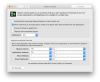
In OS X, I have the option "Displays have seperate Spaces" turned off (see screenshot). It seems Parallels have shafted anyone who prefers to have this optional off, as both fullscreen modes are broken when this option is off (reading further, it seems turning this option on introduces other issues, so a case of damned if you do, damned if you don't). This is all seems to revolve around the fact that Parallels are now exclusively using native fullscreen mode, which to say the least, sucks big time for anyone who doesn't have "Displays have seperate Spaces" turned on.
In OS X, I have the option "Displays have seperate Spaces" turned off (see screenshot). It seems Parallels have shafted anyone who prefers to have this optional off, as both fullscreen modes are broken when this option is off (reading further, it seems turning this option on introduces other issues, so a case of damned if you do, damned if you don't). This is all seems to revolve around the fact that Parallels are now exclusively using native fullscreen mode, which to say the least, sucks big time for anyone who doesn't have "Displays have seperate Spaces" turned on.
Attachments
Last edited:
You nailed it, this suck big time. I hope they address it soon.Every Parallels release, something with full screen breaks. This is probably worst. I have three monitors. If I tell parallels to use all my monitors, it puts each virtual monitor on a different desktop/space. If I tell it it not to use all monitors, then putting it into fullscreen causes parallels to create it's own whole desktop, with two blank screens.
In OS X, I have the option "Displays have seperate Spaces" turned off (see screenshot). It seems Parallels have shafted anyone who prefers to have this optional off, as both fullscreen modes are broken when this option is off (reading further, it seems turning this option on introduces other issues, so a case of damned if you do, damned if you don't). This is all seems to revolve around the fact that Parallels are now exclusively using native fullscreen mode, which to say the least, sucks big time for anyone who doesn't have "Displays have seperate Spaces" turned on.
Still not fixed.
So to describe the problem exactly.
Retina MacBook Pro, w El Capitan
Windows 10 v1607
One external Apple 20" Cinema Display via Mini Displayport -> DVI, running with NVidia discrete graphics.
Windows VM is set to use all displays in full screen.
When I go fullscreen, normally I can multi-finger swipe right to get to dashboard, then left to get to mac, then left again to get to windows.
The Windows should display two windows 'screens' at the same time on my two displays (I am not mirroring, and windows is set to extend the desktop... you know... because I'm actually WORKING in Windows doing WINDOWS development)
When I'm in Windows I'm 100% in Windows, I'm not trying to have an half and half mac/windows fullscreen 'experience'.
NOW, instead of this working, I have ( [main display | external display] "->" is swipe right
[dashboard][dashboard] -> [mac|mac] -> [windows|blank] -> [blank|windows]
instead of
[dashboard][dashboard] -> [mac|mac] -> [windows|windows]
which is useless. I can not see BOTH of my windows screens at the same time, so I might as well not have two windows screens.
Or I could just go back to PD11, where it works.
EDIT: I have "displays have separate spaces" turned off.
So to describe the problem exactly.
Retina MacBook Pro, w El Capitan
Windows 10 v1607
One external Apple 20" Cinema Display via Mini Displayport -> DVI, running with NVidia discrete graphics.
Windows VM is set to use all displays in full screen.
When I go fullscreen, normally I can multi-finger swipe right to get to dashboard, then left to get to mac, then left again to get to windows.
The Windows should display two windows 'screens' at the same time on my two displays (I am not mirroring, and windows is set to extend the desktop... you know... because I'm actually WORKING in Windows doing WINDOWS development)
When I'm in Windows I'm 100% in Windows, I'm not trying to have an half and half mac/windows fullscreen 'experience'.
NOW, instead of this working, I have ( [main display | external display] "->" is swipe right
[dashboard][dashboard] -> [mac|mac] -> [windows|blank] -> [blank|windows]
instead of
[dashboard][dashboard] -> [mac|mac] -> [windows|windows]
which is useless. I can not see BOTH of my windows screens at the same time, so I might as well not have two windows screens.
Or I could just go back to PD11, where it works.
EDIT: I have "displays have separate spaces" turned off.
Last edited:

Guna@Parallels
Parallels Support
The issue is under investigation by our devs . We are planning to fix it in our future builds. Stay tuned for updates.
A related issue - with the black screen, I can't seem to shut down Windows. It just sleeps or whatever the term is. How can I effect a complete shutdown without seeing anything but black? (and Actions - Shut Down doesn't seem to do anything, but I'm really not sure with the black screen - is it waiting for some keyboard input?)
SimonAntony
Bit poster
I've got the same problem - upgraded and now get a black screen - cant do jack with it now - reinstalled, tried the modularity tick box on/off and no difference.
Doesnt look like I can turn the VM off either, just suspends
Frustrated yet again!
Doesnt look like I can turn the VM off either, just suspends
Frustrated yet again!
SimonAntony
Bit poster
Tried but that failed too - however support came back to me, told me to use the Stop menu item to kill the machine then restart it - after that it worked fine.Same problem here, this is very inconvenient. Can we downgrade back to 11 as it works just fine?