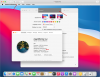
Big Sur Public Beta and Parallels 16 - Only showing a 3Mb graphics card

I just tested Window & Catalina & Big Sur Beta:
I can change Graphic Memory to any value (was 64kb), yet also with 1 GB the performance of macOS ist inferior and jumby. Big Sur public beta does not manage a higher resolution than 1024 x 768. Installation of Parallels tools worked for Catalina, but with Big Sur no effect is visible.
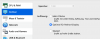
 
Supplementary Info: One can increase Graphics 1GB but effectively it is just 3MB
I would welcome to see PARALLELS-Support becoming active in this Blog!
Bildschirmfoto 2020-09-25 um 15.32.59.pngScreenshot 2020-09-25 at 15.35.59.png
 
I tried Fusion 12 from my Catalina and mac os 11 works great! I'm installing beta 7 ...
And it's free for personal use... goodby parallels.
Well not sure how do you define "great", but my experience is far from great on Fusion. There macOS Big Sur is very sluggish and has lot of graphical artifacts, e.g. broken menu bar transparency, certain title bars have weird background like Preferences bellow. The only advantage is that it shows 128 MB video card, not 3 MB as PD16, so it works with Retina. Nevertheless it is certainly doable to have more than 3MB display, so please do it Parallels.
upload_2020-9-26_18-8-43.png
 
Wow, happy to have seen this thread before upgrading... so this issue has not yet been solved since early Aug?
 
This has been fixed in 16.10. I can select 2GB RAM for graphic and run high resolution display. I need to upgrade to PD16.10, upgrade to latest BigSur release and reinstall Parallels tools. I also had to enable loading ot PD extension, which Security & Privacy was blocking from loading. After ~1.5 hours of updating rebooting, etc I have relatively usable BigSur installation on which I can - finally - test software I really want to test. It is not speed daemon by any means, but it seems to boot and work relatively OK.
BigSUr "About" still shows 256MB graphic only, but that seems to be only visual bug.
 
And I now see 64Mb of video memory assigned

After a second reboot I am also seeing other higher resolutions becoming available.

Stuart
 
Thank you, Parallels! The latest update (Version 16.1.0 (48950)) has resolved the display issue, and now Big Sur beta is able to go full screen and show in multiple resolutions. This also means some of the "trickier" issues with the beta are better seen and used. It was worth the wait!
 
I just installed Parallels 16.1.0 and the Big Sur Public Beta and I can select any one of the graphics memory options but all I get inside the VM is the 3MB of graphics memory and the option of 1024x768. I have installed Parallels Tools and rebooted several times. Is there something I am missing?
 
I just installed Parallels 16.1.0 and the Big Sur Public Beta and I can select any one of the graphics memory options but all I get inside the VM is the 3MB of graphics memory and the option of 1024x768. I have installed Parallels Tools and rebooted several times. Is there something I am missing?
Did you grant access to Parallels in the Security section of System Preferences? This could be a cause. The installer does prompt but it is easy to miss
 
FYI I had older Beta 6 and I could not make the /Library/Extensions/prl_video.kext work, but with Beta 10 everything worked fine after I granted Parallels extension permission in Security & Privacy. So make sure you're installing latest beta too. Also once kext permission is granted you should see see this in Terminal:
Code:
% spctl kext-consent list
Allowed Team Identifiers:
4C6364ACXT
 
FYI I had older Beta 6 and I could not make the /Library/Extensions/prl_video.kext work, but with Beta 10 everything worked fine after I granted Parallels extension permission in Security & Privacy. So make sure you're installing latest beta too. Also once kext permission is granted you should see see this in Terminal:
Code:
% spctl kext-consent list
Allowed Team Identifiers:
4C6364ACXT
I don't see where to grant extension permission. Parallels already has full disk access.
 
In guest system (Big Sur VM) go to System preferences, Security & Privacy, and in Tab General, look in area of "Allow apps downloaded from:". there should be the extension listed and with privileges (unlock this), you can enable it.
 
Honzall, thanks for the info on the security settings! I am testing Big Sur on a Catalina host. Full screen and graphics resolution works now!
Really appreciate it.
Mark
 
In guest system (Big Sur VM) go to System preferences, Security & Privacy, and in Tab General, look in area of "Allow apps downloaded from:". there should be the extension listed and with privileges (unlock this), you can enable it.

I installed the Beta in a VM and never was prompted to accept the security settings after the Parallels Tools install. I even looked in the security area and nothing was there. I opened a support case and they were telling me that Parallels Tools wasn't installing properly. Several reinstall attempts did not resolve the issue. After Big Sur was officially released I installed that version and was able to see the extension show up in the security area and after allowing it now I have the correct resolution options. Not sure if it was something with the Beta version or just a fluke with my install.
 
In guest system (Big Sur VM) go to System preferences, Security & Privacy, and in Tab General, look in area of "Allow apps downloaded from:". there should be the extension listed and with privileges (unlock this), you can enable it.
Honzall, many thanks for this. For anyone else with a 27" Mac and stuck with a low res screen display in Big Sur, this certainly works.
I originally hit this bug when I installed macOS 11.01. Thinking it may have been bugged, I scrapped it and waited till 11.1 was released. It installed fine first time but when 11.2 was released and I decided to install it as a VM, I was back to staring at a low res screen with Graphics again set to 3Mb, despite allocating 512Mb in configuration. Reinstalling Parallels Tools didn't help either so I'd almost decided to write off my 11.2 VM when I read the above.
Thanks once again.
 
Back
Top