Big Sur (guest) on Big Sur (host) - external USB not found

ChristianK12

Junior Member
I'm trying to connect my external ILok Dongle to my Big Sur VM, but it just doesn't work.
The entry in in the Devices Menu is checked, but it doesn't show up in macOS
The same USB-device with an older Catalina VM works without problems.
It is a general bug/problem?
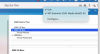
 
It looks like that Big Sur Guest-VM inside parallels (under Big Sur) not being capable of detecting USB devices
Today I received an answer from my support ticket, with points me to an article how to solve windows vm usb issues, not very helpful.

As you see in the screenshot, wether the dongle nor the HDD can be forwarded to the Big Sur VM, it is possible with the Catalina VM.

upload_2021-5-4_20-44-7.png
 
okay, here some news.
Installed a fresh Big Sur 11.3.1 with ILok License Manager, ILok was detected (hooray!), then did a snapshot.
After installing Parallels Tools and restarted the machine, again ILok was NOT detected anymore, after rolling back to the snapshot, ILok still NOT detected again (WTF).
If anybody has an idea how to debug this, or has any hints, please let me know.
 
okay, here some news.
Installed a fresh Big Sur 11.3.1 with ILok License Manager, ILok was detected (hooray!), then did a snapshot.
After installing Parallels Tools and restarted the machine, again ILok was NOT detected anymore, after rolling back to the snapshot, ILok still NOT detected again (WTF).
If anybody has an idea how to debug this, or has any hints, please let me know.
Hi,
thanks a lot for sharing your solution here.
May we ask you about the same issue with the latest Parallels Desktop version?
Did you check it if yes and you see any issues please let us know here or via private message.
 
Back
Top