
Battle Brothers (Steam) - city names on world map rendered as solid white rectangles in Parallels Desktop (Apple Silicon, Windows 11 ARM). Works fine in VMware Fusion and Crossover.
Product: Parallels Desktop for Mac (Apple Silicon)
Issue type: Graphics / OpenGL rendering regression/bug
Environment
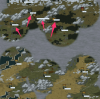
In Parallels Desktop, Battle Brothers shows solid white rectangular bars above cities on the world map where the city names/text should be. The background label rectangle is visible, but glyphs/text are missing. The bars are stable (always the same), not flickering.
Expected
City names should be rendered as text (as on PC).
Actual
White blank rectangles/bars instead of city name text on world map.
Reproduction steps
Using the same Windows 11 ARM installation image and the same game/Steam version under VMware Fusion 13.6.4 on the same Mac, the city names render correctly (custom font visible). This suggests a Parallels virtual GPU / OpenGL rendering issue.
Tried (no effect)
Workaround (confirms it's Parallels OpenGL path)
If I override opengl32.dll with Mesa and force GALLIUM_DRIVER=llvmpipe, the text renders correctly, but performance drops to ~5-11 FPS (CPU rendering). So the game assets/fonts are OK; the issue appears in Parallels graphics stack.
Also I was able to make it work with the same method (opengl32 replacement with llvmpipe mesa driver) in Crossover 25.1.1. This is the only way to play BB in Crossover, because it doesn't support opengl 3.3. But performance drops to ~10-18 FPS. Text renders correctly.
Playing in VMware Fusions as is (without replacement) also have performance drops to ~15-20 FPS, but text renders correctly out of the box.
Summarize: So the only way to play BB on Mac without significant performance drops is using Parallels (it has smooth and stable FPS), but it has this annoying visual glitch.
Related user reports (same issue)
Product: Parallels Desktop for Mac (Apple Silicon)
Issue type: Graphics / OpenGL rendering regression/bug
Environment
- Host: macOS 15.6.1
- Mac: MacBook Pro M4 Pro, 24 GB RAM
- Parallels Desktop: v26 (previous versions have this bug too)
- Guest OS: Windows 11 ARM 24H2
- Game: Battle Brothers (Steam) version 1.5.1.7/1.5.1.7 (this visual glitch exists since the release)
In Parallels Desktop, Battle Brothers shows solid white rectangular bars above cities on the world map where the city names/text should be. The background label rectangle is visible, but glyphs/text are missing. The bars are stable (always the same), not flickering.
Expected
City names should be rendered as text (as on PC).
Actual
White blank rectangles/bars instead of city name text on world map.
Reproduction steps
- Create/run Windows 11 ARM VM in Parallels Desktop on Apple Silicon.
- Install Steam and Battle Brothers.
- Launch the game, start a new campaign.
- Open the world map → observe city labels.
Using the same Windows 11 ARM installation image and the same game/Steam version under VMware Fusion 13.6.4 on the same Mac, the city names render correctly (custom font visible). This suggests a Parallels virtual GPU / OpenGL rendering issue.
Tried (no effect)
- Steam launch options: -gl30, -t2 ... -t8 (no change)
- Reset config / reinstall / DPI settings
Workaround (confirms it's Parallels OpenGL path)
If I override opengl32.dll with Mesa and force GALLIUM_DRIVER=llvmpipe, the text renders correctly, but performance drops to ~5-11 FPS (CPU rendering). So the game assets/fonts are OK; the issue appears in Parallels graphics stack.
Also I was able to make it work with the same method (opengl32 replacement with llvmpipe mesa driver) in Crossover 25.1.1. This is the only way to play BB in Crossover, because it doesn't support opengl 3.3. But performance drops to ~10-18 FPS. Text renders correctly.
Playing in VMware Fusions as is (without replacement) also have performance drops to ~15-20 FPS, but text renders correctly out of the box.
Summarize: So the only way to play BB on Mac without significant performance drops is using Parallels (it has smooth and stable FPS), but it has this annoying visual glitch.
Related user reports (same issue)
- https://www.reddit.com/r/BattleBrothers/comments/1951ax3/im_trying_to_play_battle_brothers_on_a_mac_using/
- https://www.reddit.com/r/BattleBrothers/comments/ypvdv6/blank_white_bars_over_cities_any_way_to_fix_it_no/
- https://www.reddit.com/r/BattleBrothers/comments/l3i6cv/does_anyone_know_how_to_fix_this_visual_bug_all/