Archive will not open

SimonB12

Bit poster
Hi All,

I have stupidly archived my windows 10 VM, so I have tried to unarchive it and i get the message
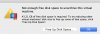
Not enough free disk space to unarchive this virtual machine
30.36 GB of free disk space is required. To try reducing other virtual machines' disk size to free up some of that space, click "Free Up Disk Space
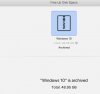
I have 111Gb available on my mac, when I click on free up disk space it just shows a screen showing windows 10 has been archived...and I am stuck

Any help welcome

Ta
 
Hi All,

I have stupidly archived my windows 10 VM, so I have tried to unarchive it and i get the message
Not enough free disk space to unarchive this virtual machine
30.36 GB of free disk space is required. To try reducing other virtual machines' disk size to free up some of that space, click "Free Up Disk Space
I have 111Gb available on my mac, when I click on free up disk space it just shows a screen showing windows 10 has been archived...and I am stuck

Any help welcome

Ta
Hi SimonB12. Please provide the total and available hard disk space on the Mac and the size of the archived virtual machine file.
 
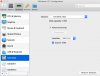
I also cannot unarchive Windows 10 in Parallels Desktop 14 for Mac, Business Edition. I was confused about memory management in Parallels, and reduced the size of the hard drive. I'm sad to say I just wasn't thinking when I archived Windows, and decided to unarchive immediately after creating the archive. Now I cannot unarchive Windows 10, as I get the same error message described above: "there isn't enough free disk space to unarchive this virtual machine." The suggestion was to free some memory by clicking "free up disk space." However, when I did that, I got a screen saying only that Windows is archived. I tried to go back and increase the size of the hard drive, which I had increased earlier, but the Properties button is grayed out; so I'm unable to access the function that allows me to make the hard drive bigger. I have attached screenshots that should give you an idea of what I've described.

I would very much appreciate your help in fixing this. Thank you!
Robin
 

Attachments

  • Screen Shot 2019-02-11 at 10.07.59 AM.jpg
    Screen Shot 2019-02-11 at 10.07.59 AM.jpg
    55.7 KB · Views: 17
  • Screen Shot 2019-02-11 at 10.08.16 AM.jpg
    Screen Shot 2019-02-11 at 10.08.16 AM.jpg
    60.6 KB · Views: 18
  • Screen Shot 2019-02-11 at 10.08.48 AM.jpg
    Screen Shot 2019-02-11 at 10.08.48 AM.jpg
    135.2 KB · Views: 18
I'm sad to say I just wasn't thinking when I archived Windows and decided to unarchive immediately after creating the archive. Now I cannot unarchive Windows 10, as I get the same error message described above: "there isn't enough free disk space to unarchive this virtual machine." The suggestion was to free some memory by clicking "free up disk space." You can solve this problem by dialing Windows Live mail support number.
 
Last edited by a moderator:
hi I am having exactly the same issue and have run clean my mac which has cleaned an extra 1 gb or so but still and getting the message not enough free space
 
Hi. I am having the same problem. I do not have any "purgeable" disk space. It is all listed as available. Parallels says I need 50gb and I have over 90gb available. Feeling stupid, generally, for archiving the VM.
 
You must restart your PC after it will work
oops... a server error occurred and your email was not sent. (#007)
 
Last edited by a moderator:
Back
Top