Applications/games not working in Windows on Arm

Don't have a lot of game/apps installed (and the one's I do have work fine). Still issues trying to get Diablo II - Resurrected to install/run according to other people. Also there are still issues with the Xbox app installing games (though I think this is a Microsoft issue from what I have read). And obviously the issue with Bluetooth controllers like the Xbox controllers not connecting properly to the Windows 11 ARM VM which seems like Parallels even though I have Bluetooth Sharing turned on can't take control from the macOS side (I have Monterey 12.2) and switch it to the Windows 11 ARM VM side.
 
Flatout 2 shows blackened cars and the tracks load in black making it unplayable. Flatout 1 has some bad shadowing problems and is sort of playable. Both games want to run full speed - showing some promise. Just graphics problems.

Love to see a Flatout 2 - my all time favorite racer working on Parallels.
 
Cyberpunk 2077 crashes on load.

Anno 1800 works almost fine with "special" settings, but disc access seems extremely slow. Gameload takes minutes, savegame loads very slowly. Once started the game is playable but again: items on the map sometimes appear "late". This seems like an issue maybe easy to fix.
 
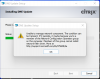
Cisco vpn client can't install on M1, for x64 windows before install cisco i need to install dneupdate64 (citrix) , M1 cant install dneupdate64
 

Attachments

  • citrix.png
    citrix.png
    129.3 KB · Views: 32
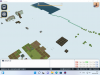
I'm trying out Parallels on M1 Mac mini and found "A-Tourism" doesn't work.
It seems the textures on the ground corrupted. How to avoid this? I would like to buy Parallels if you can fix it.
screenshot.png
 
Grow: Song of the Evertree is unplayable because large numbers of textures are missing, many surfaces are invisible, and a lot of light sources appear to be missing.
 

Attachments

  • 20220227053251_1.jpg
    20220227053251_1.jpg
    424.4 KB · Views: 14
Is the windows store included in the iso parallels makes you download? It isn't the last time I tried parallel on my Mac.

That is strange because every VM that I made using Parallels over the years has had the Windows Store. I was under the impression that the Windows Store (assuming we are talking about the same app) was part of the Windows operating system - sort of like the App Store that Apple installs as part of macOS, iOS and iPadOS and tvOS.
Don't remember if I ever used the download that is actually part of Parallels (as opposed to getting the installation files from Microsoft, purchasing a key or the UUPDUMP site) but I still always assumed it was part of the Windows installation files that Microsoft produces.
 
It wasn't there. Parallel has an article on this. But it's an old article.
Don't matter anyway since I can't use this. What I want to do don't work. Guess it'll be years if ever till these issues are fixed.
 
I use Parallels to be able to run Quicken for Windows. It has been working fine on my new M1 MacBook Pro for a week or two.
Two or three days ago, Windows update installed Build 22563.ni_release.220219-1637
Now, when I try to start Quicken, the Quicken splash dialog shows up, and that is it. Eventually Windows says it isn't responding and kills it, and sends Microsoft a report.
Today, I tried uninstalling/reinstalling quicken hoping that would fix the problem, but it did not work.

Any suggestions?
 
Windows 11 arm64 on Apple M1 MAX Chip (MacBook Pro)
Parallels version 17.1
Windows 11 installed thru Installation Assistant
Confirmed (Windows -> System -> About) that Processor is 'Apple Silicon 3.2GHz (4 Processors)
Install SQLServer Management Studio (SSMS) failed.
Install SQLServer 2019 Express failed.
 
Microsoft Links 2003. Game will install fine, but after playing around with the various resolution settings within the game the game will just quit. When I try to restart it I will get an error message saying "Cannot fine Language.dll in Program Files (x86)\Microsoft Links\Assets\Binaries" but when I check the folder the requested file is there.
If I run the Troubleshooter it changes the file properties to emulate either Windows Vista, Windows 7 or Windows 8 but the same result occurs.
 
Check point VPN does not work. Check point has said they don't plan to port support the end point client and to use capsule instead. the problem is that capsule does not support MFA.
 
Back
Top