
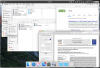
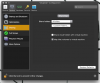
I am running an evaluation (trial) version of the Parallels Desktop 14 for Mac (14.1.3). I have a guest OS X 10.11.6 (with Parallels Tools installed) running on a host OS X 10.14.2. Generally, the guest OS seems to run fine. It has functional Internet connectivity. It mounts the Parallels Tools Shared Folders drive. It connects to the local network. It runs apps. Etc. I can switch to Coherence Mode and all the windows transfer over to the host OS just fine. What does NOT appear to work are some integrations at the host end. I had expected the host OS to mount a Shared Folders drive. This is not there. I had expected to find a folder under either `/Applications` or `~/Applications` containing guest OS applications, something like `/Applications/Parallels/Shared Applications`. This is not on the host. Further, I had expected that the under `configuration -> options` there would be a pane for applications. This is not there. It seems like the Parallels Tools host-side integration is partly broken.
To fix this I tried re-installing the guest OS, either from the install app or from a prior vbox image. I rebooted the host OS. I reinstalled Parallels tools on the guest OS. I reinstalled Parallels on the host. I tried to mount the guest OS .pvm image with Parallels Mounter.app. All to no avail. I think the most diagnostic element may be that there is no applications pane for configuration options. Any suggestions for how to fix this?
To fix this I tried re-installing the guest OS, either from the install app or from a prior vbox image. I rebooted the host OS. I reinstalled Parallels tools on the guest OS. I reinstalled Parallels on the host. I tried to mount the guest OS .pvm image with Parallels Mounter.app. All to no avail. I think the most diagnostic element may be that there is no applications pane for configuration options. Any suggestions for how to fix this?