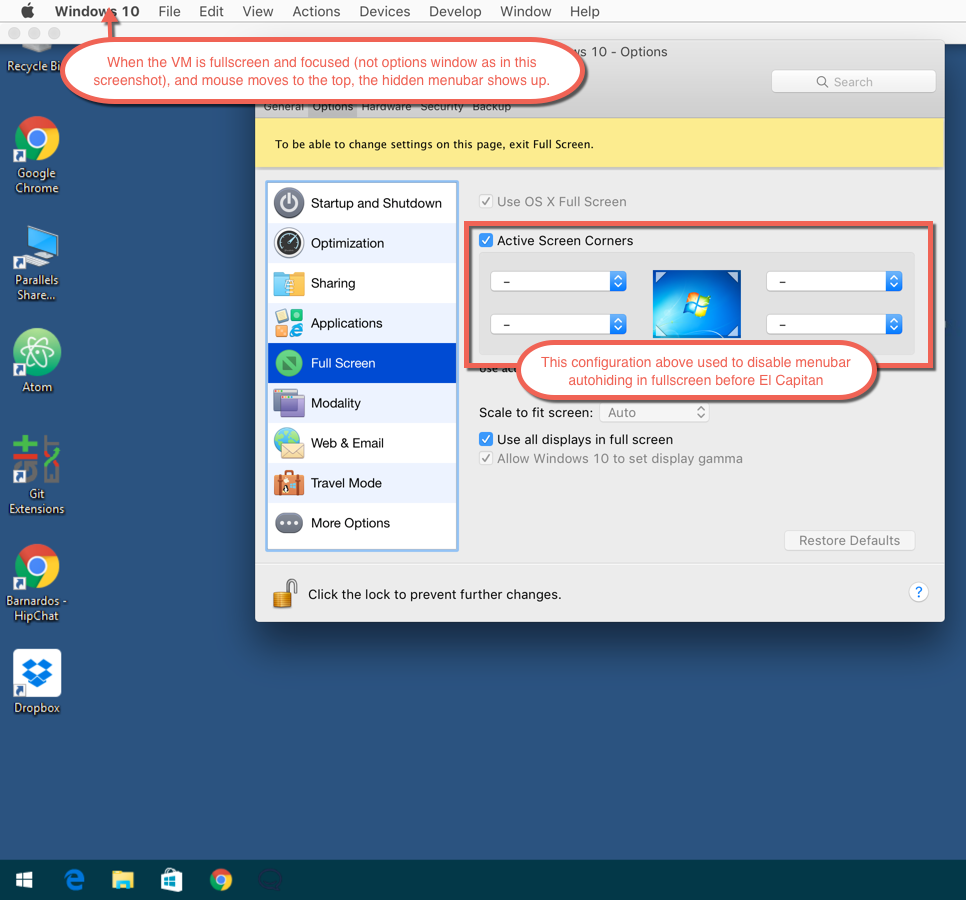
I started to write up a reply about how it's still happening on my primary monitor (but not the secondary) when all of the sudden it stopped. So it seems that it might be fixed, but still has a bug or 2. This is annoying enough that if I can't get it resolved I'm going to move onto VMWare Fusion.It's working for me with the same config in the screenshot above:
- Choose Mac OS style fullscreen
- Enable active corners (even with no corner set to anything)
Copying the picture again, obviously the red comment about the menu is outdated:

Install the app
How to install the app on iOS
Follow along with the video below to see how to install our site as a web app on your home screen.
Note: This feature may not be available in some browsers.
You are using an out of date browser. It may not display this or other websites correctly.
You should upgrade or use an alternative browser.
You should upgrade or use an alternative browser.
Annoying menu bar in El Capitan
- Thread starter sinsro
- Start date
Same as what MohamedM1 has posted in #38What settings are you using to get it to work? Mine is not working with the latest update.

Hi Sinsro, please generate a problem report using this article http://kb.parallels.com/9058 and reply with the report ID (8-digit)
Does anyone have an open ticket for this issue? I have the same problem with the latest version of Parallels 10, Win 7 VM and El Capitan.
The menu bar keeps appearing whenever my mouse approaches the top of the VM. My environment is:
- MacBook
- El Capitan
- Windows 7 VM
- Parallels 10.3.0 (29227)
Thanks, RF
The menu bar keeps appearing whenever my mouse approaches the top of the VM. My environment is:
- MacBook
- El Capitan
- Windows 7 VM
- Parallels 10.3.0 (29227)
Thanks, RF
Just updated to El Capitan version 10.11.4 (15E65) a few minutes ago and the Menu/Dock problem has been fixed.
Do the Update and Re-configure as http://kb.parallels.com/en/123101
Parallels Version 11.1.2 (32408)
Do the Update and Re-configure as http://kb.parallels.com/en/123101
Parallels Version 11.1.2 (32408)
Last edited: