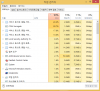
After upgrading to Mavericks, Act Mon says Windows 8 (not responding)

I'm sorry but this is not true, at least for me. Performance are affected!!! Even if the virtual machine is in stand by the "Windows 7 (not responding)" process is around 5% CPU usage and sometimes it goes up over 100%.

Actually, these are likely 2 different problems and not related, I've also seen the not responding thing in activity monitor without seeing any impact whatsoever in VM performance.

From my own experience also, I've seen this sluggish behaviour as a result of installed hardware drivers on the Windows side, specifically in a bootcamp Windows XP VM I migrated to a virtual disk, after removing the Bootcamp and Logitech drivers the problem was solved.
 
Actually, these are likely 2 different problems and not related, I've also seen the not responding thing in activity monitor without seeing any impact whatsoever in VM performance.

From my own experience also, I've seen this sluggish behaviour as a result of installed hardware drivers on the Windows side, specifically in a bootcamp Windows XP VM I migrated to a virtual disk, after removing the Bootcamp and Logitech drivers the problem was solved.


I don't agree at all. The problems are related!!! My CPU is used between 5% and over 50% by the "Windows 7 (not responding)" process while the Guest machine is off (suspended).
This is unacceptable.
On October 25th I submitted my ID 30213413, 6 days ago your colleague Andrew wrote "Hi Marcello,hope to have more info for you tonight/tomorrow. Will let you know. Thx,Andrew". After 6 days I didn't get any answer. THIS IS UNACCEPTABLE!!!!
After spending time and money I'm very angry with Parallels and I will look for a different software/solution.
 
Okay, here is what I did.

Download Windows 8.1 from Microsoft, clean install the Windows 8.1. I know this cannot be a solution and it doesn't even fix the activity monitor saying not responding.
But I had two issues, not responding issue and the sluggish performance issue. After clean install of Win 8.1, at least the VM is not slow anymore. Although I now have to re-activate my Windows and re-install every software again, I can use VM now.

I swear I am not going to buy any of parallels product again. This is insane. Every year they update their product and ask me to pay like $60. This year they even ask the subscription fee for using remote access. This is not acceptable. If It was free update just like Mavericks, I might have understood those problems. Good bye Parallels
 
I don't agree at all. The problems are related!!! My CPU is used between 5% and over 50% by the "Windows 7 (not responding)" process while the Guest machine is off (suspended).

Why are they related? The fact that they are happening at the same time does not prove anything. Google Chrome helper is currently appearing as Not Responding in my Activity Monitor, as I type this, and everything in Google Chrome is working correctly, the "Not Responding" thing is a problem with the Activity Monitor and doesn't reliable prove the actual responding state of an application. The fact that the problems aren't related does not diminish your performance problem, I'm just clarifying that these are unrelated.
 
On October 25th I submitted my ID 30213413, 6 days ago your colleague Andrew wrote "Hi Marcello,hope to have more info for you tonight/tomorrow. Will let you know. Thx,Andrew". After 6 days I didn't get any answer. THIS IS UNACCEPTABLE!!!!
After spending time and money I'm very angry with Parallels and I will look for a different software/solution.

Hello MarcelloS,
Sorry if I was not clear that the update has been sent on the forum (in this thread) but not on Twitter:
http://forum.parallels.com/showthre...ot-responding)&p=705719&viewfull=1#post705719

Parallels Development Team is working on a fix. Stand by for the product update.
 
Hello MarcelloS,
We are checking your problem report ID with the development team.

All - please post your problem report ID's here, it will help to find a solution sooner: http://kb.parallels.com/en/9058

If I may I have a workaround,

I'm experiencing the same problem since august (before ||8 and windows 7) --> CPU over 100%
Today, I installed the Windows 8.1 with Maverick and || 9 last build --> still CPU over 100% and windows not responding It took me the 1/2day just to install.

The only workaround I still have (this was also working with mountain lion and ||9) for the moment is :

Un-install parallels
Restart my macbook pro
Install parallels
And Then... Problem Solved --> The only problem with this is I need to do this every time I shutdown and start my Macbook pro

I using a Macbook pro Mid 2009 (with the SSD Upgrade)
All Maverick, Parallels etc are up to date !

Hope this will help waiting a solution from parallels.
 
OMG. When this problem will be fixed? Next week I'm checking alternative product. Anyone did it?

I am using VMFusion trial at the moment. Looks like its a good substitute for parallels.

My problem was cpu usage over 100% and not responding issues. They gave me a solution of clean install parallels with the latest update, but it, of course, didn't change a thing. Every once a year when they update their product with the excuse of OSX update or Windows update, so many problems are found. By the time it gets stabilized, a new update from apple or ms come. Then parallels update their product again with lots of bugs. It's just never ending. I spent so much time fixing this issue recently, and now I ended up with so much anger with these guys.
 
Having same problem on PD8 with Windows 7 installation. On Mountain Lion, could run Autodesk Inventor Pro 2013 (with latest updates) just fine. Installed Mavericks, no other known changes to system, and now Inventor is essentially unusable. Symptoms are a degradation of Inventor's response speed to the point where it hangs and an increase in Parallels power consumption. Happens with or without other applications running. Have tried what prior posters have tried, no effect (well, I didn't install Windows 8).

I would encourage the Parallels team to prioritize fixing this problem for PD8 and PD9 users. I'm evaluating competitive products for my company starting tomorrow.
 
I've also logged a support call about this issue, only to have very little actual support beyond going through a number of un-install and re-install processes (basically with multiple re-boots along the way). I was then told the only way to fix the issue is for a remote admin session, something that I just can't accept as this is a sensitive work PC.

I've created a new thread with a few more screen shots if anyone is interested, in this instance my CPU is only 40% or so, but can be over 100%, whilst the virtual machine is sitting with 1-2% CPU
http://forum.parallels.com/showthre...ance-issues-with-PD9-Mavericks-Windows-8-1-VM

Given I only just purchased PD9, sadly I seem to have no option at this time to ask for a refund and stump up some cash for Fusion.
 
Last edited:
I've also logged a support call about this issue, only to have very little actual support beyond going through a number of un-install and re-install processes (basically with multiple re-boots along the way). I was then told the only way to fix the issue is for a remote admin session, something that I just can't accept as this is a sensitive work PC.

I've created a new thread with a few more screen shots if anyone is interested, in this instance my CPU is only 40% or so, but can be over 100%, whilst the virtual machine is sitting with 1-2% CPU
http://forum.parallels.com/showthre...ance-issues-with-PD9-Mavericks-Windows-8-1-VM

Given I only just purchased PD9, sadly I seem to have no option at this time to ask for a refund and stump up some cash for Fusion.

I`m thinking about to ask a refund too...
 
Jean-Pierrel: what happens when you put your MPB to sleep instead of shut-down ?

This will work (This what I do I put to sleep and move my MPB with care... ) and IF I need to move it on a long distance I shutdown and redo the "uninstall-restart-install" process....
 
Yes, I also see ongoing hangs from the VM process in Activity Monitor. PD8 + Win 7 + Autodesk Inventor 2013 running on a 16GB MBPr.
 
Jean-Pierrel: do I understand our "uninstall-restart-install process" comprises: trash the Parallels APP & down-load it again ?
(I am still not used to the lack of the "un-install" feature on Mac that is evident on PC)
 
Back
Top