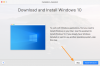
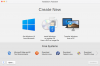
I upgraded to Parallels 17 this week, installed it but now Parallels won't open. Windows is installed but it seems like it wants another Windows installed. I pressed Skip (see screenshots) and then it takes me to another screen. It is not finding the Windows OS I already have installed. I think it is Win 10 but I am not 100% sure. Parallels 17 requires Win 10 correct? If that is the case can you tell me how to determine what version is installed?

After upgrading and installing Parallels 17 - it is wanting a Window OS
- Thread starter DebbieG
- Start date