
I have an Ubuntu 22.04 guest (x86_64 emulated version installed by parallels) which was running fine before.
I updated today to latest version and now the said guest is in a sleep status (hasn't been in the status before update).
When I try to resume I get an error message about CPU number is incorrect (hasn't been the case before) and that I need to change the CPU number before resuming the guest.
When I try to do this I find I cant because the guest is in sleep status...
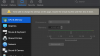
Sleep status found after upgrade:

Cant resume cause of CPU mismatch:

Also cant change CPU numbers:
How do I get out of this loop?
I updated today to latest version and now the said guest is in a sleep status (hasn't been in the status before update).
When I try to resume I get an error message about CPU number is incorrect (hasn't been the case before) and that I need to change the CPU number before resuming the guest.
When I try to do this I find I cant because the guest is in sleep status...
Sleep status found after upgrade:
Cant resume cause of CPU mismatch:
Also cant change CPU numbers:
How do I get out of this loop?