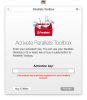
Activating Parallels Toolbox fails

IanP1

Bit poster
I just bought two new licences for Parallels Desktop 13. I installed this on two of my Macs, putting in the licence for each. On the first Mac, it told me that my purchase includes a licence for Parallels Toolbox, and I duly installed that. On the other Mac I did the same thing, but for some reason the Toolbox icon on my menu bar does not accept the activation.

I would be grateful if someone could tell me how I resolve this. Thanks,


Ian.
--
 
Hello @IanP1, Please let us know what happens when you are trying to activate? do you get any error message or please share a screenshot so that we can check and assist you.
Thanks
 
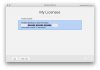
No problem. Here are two screenshots; first, the licence screen for Parallels Desktop. Second, the screen that I see when I click on the menu bar icon for Parallels Toolbox. I have obscured the licence codes.

Thanks,

Ian.
--
parallels desktop.png
parallels toolbox.png
 
Any thoughts on this? It's a bit irritating being prompted for a key for a product that I have bought.
 
Back
Top