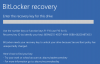
I managed to find mine keys as well-- the process was not trivial when you have multiple accounts and VMs.. but assuming you KNOW the account associated with the VM and you can log into it, etc. then its possible to recover the key.
This doesn't help people that don't know/have/remember the email+pw associated to the MSFT account (not sure one is even required to use Bitlocker), and/or if you have many VMs as this is a PITA because you can't even copy-n-paste, you have to type it in manually (another PITA if you have a lot of VMs).
Not INFORMING the end-user that, "Hey, if you upgrade and use Bitlocker, you'll be down until you can enter your recovery key" would have been a REALLY good thing to do... I can see this causing a large number of issues for many people (esp. for VMs that were made for them by friend/some-support-person/IT/etc)
REALLY big oversight IMHO not stopping the install immediately with a pop-up "Upgrading will prevent the following VMs from booting until you enter the bitlocker recovery key: <list of VMs> .. make sure you can log into your MSFT account and verify you have your bitlocker key available... Failure to do so will lock you out of the VM and ALL OF ITS DATA".