Has anyone been having an issue with windows 10 in Big Sur where the vm shuts off after an update seems to occur, then right after login the vm shuts off? started today, and I can only replicate it with windows 10. it happens after an update applies (could be a new update) and I know this because I had the vm backed up and it starts up, then applies some update then after restart it performs this unexpected behavior.

Install the app
How to install the app on iOS
Follow along with the video below to see how to install our site as a web app on your home screen.
Note: This feature may not be available in some browsers.
You are using an out of date browser. It may not display this or other websites correctly.
You should upgrade or use an alternative browser.
You should upgrade or use an alternative browser.
macOS Big Sur and Parallels Desktop
- Thread starter IvanD@Parallels
- Start date
I was able to get past this, but NOT setting up iCloud (skip) and just create a local account. This got me past the login screen, but now I'm having the issue that the "Parallels Tools" install doesn't actually install it (or is not activated for some reason)...
Here's a movie. The endless login cycle that you never, ever, ever get past.
https://www.dropbox.com/s/aicfrwl9at6fumc/Capto_Capture 2020-06-27_03-37-03_PM.mp4?dl=0
Here's a movie. The endless login cycle that you never, ever, ever get past.
https://www.dropbox.com/s/aicfrwl9at6fumc/Capto_Capture 2020-06-27_03-37-03_PM.mp4?dl=0
More time completely wasted. Probably the tenth attempted install. What a joke.
ChristopherG1
Bit poster
I have the same issue. Unable to login after installation.More time completely wasted. Probably the tenth attempted install. What a joke.
Nothing worked. Tried no password on the admin account. Tried not logging in to iCloud. Turns out all the suggestions were red herrings, and for me, worthless. I have a non-working beta in Parallels with a login screen that that spins, blacks out, back to login screen; spins, blacks out, login screen. Boom. Boom. Boom.
It just doesn't work.
It just doesn't work.
I am experiencing big problem in both Windows 7 and XP clients on my macbook pro using big sur. 1 2 and t y does not working makes me difficult to log onto any online payment clients(which I can only access in windows).Hello everyone! This thread is dedicated to your feedbacks and questions about macOS Big Sur and Parallels Desktop, feel free to share them. Since the beta version of macOS Big Sur has just been released, the compatibility of Parallels Desktop and macOS Big Sur hasn't been fully tested yet by the Parallels Engineering Team. On the other hand, your feedbacks will help us to test and cover as many scenarios as possible. If your feedback includes technical data along with a short description of the situation you encountered, it will make further troubleshooting and resolution more efficient.
Would you please make a quick fix for it, thanks.
I got message from SUpport to add the missing keys into Shortcuts for respective VM under options.Ive also found 1 and 2 keys not working. Shift and the key does (same on the t and y).
Very odd bug!
Attachments
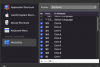
Configure missing keys as Shortcut within Parallels Preferences...I'm also having issues with "1" and "2".
Attachments
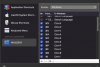
How did you install parallels desktop 16 build 48516, i am still not able to get installed for it? FYI, i am paid user of 15.First issue.... parallels desktop 16 build 48516
I tried to report this through the beta reporting mechanism, but it appears to be dead and hangs.
Attempting to install Big Sur beta released today on top of fresh Catalina 15.5.5 with parallels tools installed. Installation fails at the point of selecting the target hard drive... Any thoughts ?
MichaelM92
Member
Install WITHOUT setting up Apple ID/iCloud. This will workaround that issue. Of course, you won't have access to App Store or any iCloud service, except through the browser.I have the same issue. Unable to login after installation.

Maria@Parallels
Problem solver
Thank you for sharing this information with us. We will involve Parallels Engineering Team in this case and contact you once we get any updates.
- Big Sur login displays a black screen after login and then returns to login screen. Report ID: 343362081
- Big Sur hangs after installing Parallels Tools. Report ID: 343360898
Thank you for your cooperation.
Maria@Parallels
Problem solver
Hello,I have too same problem when input key 't', 'y','1','2'. I can't input 4 letters. But do work when with shift key like T, Y, !, @.
I am looking forward to wait this solution, at least temporal method. Thanks
please try the following:
From the menu bar click Parallels Desktop icon (II) > Preferences > Shortcuts, then select the VM in question and click the plus button to create the corresponding shortcut for the necessary symbol. Repeat for each symbol that cannot be typed.
Please share any results with us.
Maria@Parallels
Problem solver
Hello, Parallels Engineering team are working on the resolution. Once and update or workaround will be available we will let you know.I think this is where everyone is, right now..I have not seen a solution/workaround posted yet...
Maria@Parallels
Problem solver
Hello, please try the following:I am looking forward to see solved this,, urgently !! . thank you
From the menu bar click Parallels Desktop icon (II) > Preferences > Shortcuts, then select the VM in question and click the plus button to create the corresponding shortcut for the necessary symbol. Repeat for each symbol that cannot be typed.
Maria@Parallels
Problem solver
Hello,I installed Big Sur onto an already existing Catalina test machine with Parallels 15 on there already also. Can't start Parallels as all i get is the "To complete Parallels Desktop setup, please restart your Mac."
Anyone have a solution to this? I don't want to start my OS installs all over again.
Thanks
could you please collect a tech report data once the issue reproduced and post your report's ID here?
Looking forward to your reply.
Maria@Parallels
Problem solver
Hello,I am in a similar boat - installed MacOS Big Sur on my MacBook Pro. Since then I get the "To complete Parallels Desktop setup, please restart your Mac." error, and the same result of needing to Force Quit Parallels, and restarting the machine having no affect on the situation. I have submitted a technical report for this - ID 343418720. Hopefully we can get some information on/a resolution for the issue.
Thanks a lot for the provided information. We will escalate this issue to the Parallels Engineering Team for the further investigation.
Maria@Parallels
Problem solver
Hello,I'm having multiple issues with Parallels on MacOS Big Sur Beta. When loading Parallels I cannot type a 1 or a 2. All other keys work inside and outside of Parallels. Also when shutting down Parallels it crashes and becomes unresponsive. The only way to quit it is to Force quit. I've tried uninstalling and reinstalling multiple times to no avail.
please try the following steps:
From the menu bar click Parallels Desktop icon (II) > Preferences > Shortcuts, then select the VM in question and click the plus button to create the corresponding shortcut for the necessary symbol. Repeat for each symbol that cannot be typed.
Maria@Parallels
Problem solver
Hi,Same exact problem here after I installed Big Sur beta on 2019 Mac Pro. The letters "t" and "y" don't work but the numbers "1" and "2" also don't work for me (this is on a bluetooth keyboard, btw). I can do a capital "T" and "Y" and ! and @. I've removed and re-installed Parallels and Toolbox, tried wired keyboards instead, tested on another VM (Ubuntu) but those same keys do not register at all.
we please check and try the following workaround:
From the menu bar click Parallels Desktop icon (II) > Preferences > Shortcuts, then select the VM in question and click the plus button to create the corresponding shortcut for the necessary symbol. Repeat for each symbol that cannot be typed.
Maria@Parallels
Problem solver
Hello, it's a know issue and Parallels Engineering Team are currently working on the resolution.I have the same issue. Unable to login after installation.
Thanks you for your time.
I have a similar issue on my MBP2018. "1" and "2" don't work in any VMs. I have tried Windows10, Ubuntu and Mint and even reinstalled Big Sur but the problem is still there.I installed the Big Sur beta on a 2018 Mac Mini (host OS) and found that the "t" and "y" keys don't work in any Parallels VMs. I noticed that right away on a Windows 10 VM and also found that the keys didn't work on a Linux live boot CD. Creating a custom entry send-key for "t" and "y" does work - had to do that to enter a password
Other than that obviously important issue, I was pleasantly surprised that everything else seems to generally work under Big Sur.
I know this is completely unsupported by everyone involved, but any guesses on a workaround? I didn't see many options to try fiddling with in terms of keyboard settings.
