macOS Big Sur and Parallels Desktop

IvanD@Parallels

Parallels Team
Hello everyone! This thread is dedicated to your feedbacks and questions about macOS Big Sur and Parallels Desktop, feel free to share them. Since the beta version of macOS Big Sur has just been released, the compatibility of Parallels Desktop and macOS Big Sur hasn't been fully tested yet by the Parallels Engineering Team. On the other hand, your feedbacks will help us to test and cover as many scenarios as possible. If your feedback includes technical data along with a short description of the situation you encountered, it will make further troubleshooting and resolution more efficient.
For your convenience we created KB article about the known issues with macOS 11 Big Sur and Parallels Desktop for Mac. Check the KB for more information and subscribe to get timely updates on the available workarounds and fixes.
 
Last edited by a moderator:
Does the Parallels team have any solution on the issue where the user enters the password in Big Sur but it returns to the login screen again? This is an issue that I am facing now and I also realize that others have the same issue.
 
Does anyone know when Parallels will start selling their next version? Historically speaking Parallels usually launches the new version before the new Mac OS version and bugs that occurred with the old Parallels on the new OS version are mitigated in the new version. This way they keep the one-year subscription going.
 
FYI all, the Parallels tech support was awesome. Reviewing the missing keyboard presses for T, Y, 1, 2, they found a way to workaround neatly.

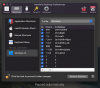
Simply to go into Parallels app > Preferences > under your "Virtual Machine" (ie Windows 10), > Shortcuts > Add new shortcuts where you map "1" to "1", and so on. It's made life back to normal!
View attachment 16242 View attachment 16243
Perfect, works a treat bud. Thank you
 
  1. Create a new Parallels VM by installing a fresh copy of macOS Catalina from Recovery Partition (or use existing VM) and Resize disk drive to be at least 90 GB if you have to copy the Big Sure image to the applications folder to proceed with the installation
  2. DO NOT INSTALL Parallels Tools or uninstall it if it's already installed (tools are needed to drag and drop the Big Sure image from real mac to the CatalinaVM Application folder, then uninstall them
  3. Login to Apple Developer Program with safari, always in CatalinaVM, to recognize and authorize the virtual macOS
  4. remove the user login password, which you have set in CatalinaVM, so that at the end of the installation of Big Sure it is not asked to avoid problems
  5. install Big Sure.... .after the necessary time, about 1 hour, the procedure will be completed and there will be automatic login in Big Sure ... the system seems a little bit unstable and it can happen suddenly that the login mask for entering the password is displayed (bug ...) insert it and you return to the desktop ... some icons are missing in the upper right bar (bug ...)
 

Attachments

  • aaa.png
    aaa.png
    743.8 KB · Views: 19
Does the Parallels team have any solution on the issue where the user enters the password in Big Sur but it returns to the login screen again? This is an issue that I am facing now and I also realize that others have the same issue.
Hello, could you please share a bit more details about the issue with us?
Also could you provide us with the screenshots of the issue?
 
I could only install Parallels 15 on Big Sur after removing a previous installation of VirtualBox. (It had kernel extensions that messed up the dependencies of Parallel's kernel extensions.) Even after getting Parallels running, its kernel extensions are still shadowed in /Library/StagedExtensions/Applications/Parallels Desktop.app, even though they successfully load. Parallels doesn't quit gracefully; I have to force-quit it.

I too noticed the bizarre bug of the "t", "y", and "2" keys not registering unless I create modifier-key-less shortcuts for them in the Parallels preferences. That's almost a usable workaround... in another bizarre twist, there's a short delay after typing shortcuts, during which no other key registers. E.g., if you type "tu" in rapid succession, you just get "t", but if you wait a little bit in between you get both characters. I hope this weird bug is easy to squash, because it's extremely annoying. :)

I have too same problem when input key 't', 'y','1','2'. I can't input 4 letters. But do work when with shift key like T, Y, !, @.
I am looking forward to wait this solution, at least temporal method. Thanks
 
Back
Top