You are using an out of date browser. It may not display this or other websites correctly.
You should upgrade or use an alternative browser.
You should upgrade or use an alternative browser.
USB issues after OS X 10.11.2 update
- Thread starter Wise87
- Start date

Hi, Please follow the steps mentioned below to fix the issue USB issue.
1. Connect USB device to virtual machine and create problem report (Actions > Send Technical Data) and save the ID.
2. Shut down your virtual machine.
3. Unplug all possible USB devices from host.
4. Turn off shared camera, shared Bluetooth, shared printers:
- Open virtual machine settings ( http://kb.parallels.com/117287 ) > Hardware > USB & Bluetooth > Be sure that Automatic sharing of Web cameras and Bluetooth devices is unchecked.
5. Go to the Boot Order tab > Boot Flags and type the following flags:
devices.usb.keyboard=0; devices.usb.mouse=0
6. Start virtual machine and check how it works.
1. Connect USB device to virtual machine and create problem report (Actions > Send Technical Data) and save the ID.
2. Shut down your virtual machine.
3. Unplug all possible USB devices from host.
4. Turn off shared camera, shared Bluetooth, shared printers:
- Open virtual machine settings ( http://kb.parallels.com/117287 ) > Hardware > USB & Bluetooth > Be sure that Automatic sharing of Web cameras and Bluetooth devices is unchecked.
5. Go to the Boot Order tab > Boot Flags and type the following flags:
devices.usb.keyboard=0; devices.usb.mouse=0
6. Start virtual machine and check how it works.
Hey, I would like to let you know that we have already involved our Development in this case and they are currently working on the resolution.
Same problem. when I click on an a device in the "External Devices" panel it disappears. I have to quit Parallels and then reboot the MAC, restart Parallels then they re-appear. Have also tried suggesed fixed without success. Paralles 11 MAC El Capitan 11.2.Add me to the list. None of my USB works after updating to OS X 10.11.2. I see others have reported the same problem. Are we close to a fix? I tried all the suggestions mentioned so far with no results. For now I now have to use my Windows laptop until this is fixed.
is there an update regarding that issue?Hey, I would like to let you know that we have already involved our Development in this case and they are currently working on the resolution.
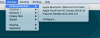
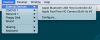
Hi Martin, please disconnect the USB device from Mac physically and reconnect it back. The device will become available in the virtual machine.
To return device connectivity back to the Mac OS, disconnect it from the virtual machine via the Devices menu -> External Devices and check how it works.
To return device connectivity back to the Mac OS, disconnect it from the virtual machine via the Devices menu -> External Devices and check how it works.
go here download driverAdd me to the list. None of my USB works after updating to OS X 10.11.2. I see others have reported the same problem. Are we close to a fix? I tried all the suggestions mentioned so far with no results. For now I now have to use my Windows laptop until this is fixed.
http://www.acs.com.hk/en/driver/4/acr38-smart-card-reader/
This fixed all my USB and Card reader problems
Look for OSX
MBP 2011 and MBP2012 Mac Mini 2010
install then SMC and NPRAM
Glad your issue has been resolved successfully. Feel free to reach out anytime. We are here to help. Thanks!
Hi Andre, please create a Problem Report for the virtual machine as described here http://kb.parallels.com/9058 and provide us with the Problem Report ID.
Hi Andre, please create a Problem Report for the virtual machine as described here http://kb.parallels.com/9058 and provide us with the Problem Report ID.
A problem report with the ID number 84260907 has been sent to Parallels
Hey, I would like to let you know that we have already involved our Development in this case and they are currently working on the resolution.

ManojK@Parallels
Parallels Support
Please refer to this article which addresses the workaround for now.
Your workaround doesn't work if your using the Apple Internal Card Reader. When I first view the USB devices PD shows "Apple Internal Memory Card Reader.
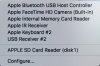
When I install my card it changes to Apple SD Card Reader (Disk 1).
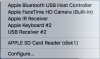
I than select it and I get the error, Unable to connect.
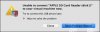
This has been happening since the Apple Update. Before the update my reader never said Apple SD Card Reader (Disk 1). It was always Apple Internal Card Reader.
Report ID: 84426644
When I install my card it changes to Apple SD Card Reader (Disk 1).
I than select it and I get the error, Unable to connect.
This has been happening since the Apple Update. Before the update my reader never said Apple SD Card Reader (Disk 1). It was always Apple Internal Card Reader.
Report ID: 84426644
Attachments
Last edited: