The issue is most probably related to the Fusion Drive partition schema.
I have submitted all collected information on this issue to our Development team for further deep investigation. The Development Team will continue the work on the issue.
Thank you again for reporting about this issue, we will do our best to improve the product in our future updates.
As a workaround you may try to perform the following:
I. Enable the Debug Menu in Disk Utility
- Quit Disk Utility if it is open.
- Launch Terminal, located at /Applications/Utilities.
- Enter the following command at the Terminal prompt:
defaults write com.apple.DiskUtility DUDebugMenuEnabled 1
- Press enter or return.
- Close Terminal.
(To disable the Debug Menu in Disk Utility you need to execute the following command at the Terminal prompt:
defaults write com.apple.DiskUtility DUDebugMenuEnabled 0
)
II.
1. Launch Disk Utility, located at /Applications/Utilities -> Click on Debug menu -> check 'Show every partition'.
2. Clink 'New Image' to create a blank disk image (.dmg) -> click 'Size' and choose '4.6 GB (DVD-R/DVD-RAM)' -> click 'Partitions' and choose 'Single partition - CD/DVD with ISO data' -> specify your /Documents/Parallels/ folder as directory where to you want to safe .dmg file -> name file (for example MacOS) -> click 'Create'.
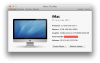
(see screenshot 1)
3. Highlight 'Recovery HD' -> click on 'Restore' tab (the Source field should be filled with 'Recovery HD') -> drag and drop 'Disk Image' to 'Destination' -> click Restore -> choose 'Erase' -> wait till the end of the process.
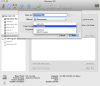
(see screenshot 2)
III.
1. Start Parallels Desktop -> go to File -> New...
2. Choose 'Install Windows or another OS' -> Continue -> under 'Install from' select 'Choose an image file...' -> specify the path to earlier created .dmg file -> Continue