Parallels Service & 10.8 (Mountain Lion)

87racer,
We have lift off. I followed these last instructions and all is good. Thank you ver much for your help and also your patience.
Bob

Good! Also, glad to help. It's nice to help someone that can provide useful information and follow instructions. :) Makes troubleshooting way easier.
 
Can't boot in 32 bit Mode

Hi:

I have been trying to get PD7 to work with ML and been following this thread, but I can't seem to boot in 32 bit mode. I have tried the Terminal command sudo systemsetup -setkernelbootarchitecture i386 and also holding 3 and 2 on startup but when I log in System info shows I am still in 64 bit mode. If I try to launch the desktop launcher, I always get a kernel panic, and then need to hold the power button to restart.
I am running a MBP 17" 2.3 Ghz, core i7 with 8 Gigs of Ram and a SSD internally. Not sure what to do, but would really like to run PD7.
Any suggestions would be appreciated.
 
Hi:

I have been trying to get PD7 to work with ML and been following this thread, but I can't seem to boot in 32 bit mode. I have tried the Terminal command sudo systemsetup -setkernelbootarchitecture i386 and also holding 3 and 2 on startup but when I log in System info shows I am still in 64 bit mode. If I try to launch the desktop launcher, I always get a kernel panic, and then need to hold the power button to restart.
I am running a MBP 17" 2.3 Ghz, core i7 with 8 Gigs of Ram and a SSD internally. Not sure what to do, but would really like to run PD7.
Any suggestions would be appreciated.

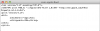
Try editing /Library/Preferences/SystemConfiguration/com.apple.Boot.plist to inlcude the "arch=i386" Kernel Flag then reboot.
Should look like attached screenshot. Keep in mind though, Mountain Lion will always boot into 32-bit mode with this set. To get back to 64-bit mode remove the "arch=i386" flag.
 

Attachments

  • Screen Shot 2012-02-20 at 2.55.19 PM.png
    Screen Shot 2012-02-20 at 2.55.19 PM.png
    16.6 KB · Views: 58
Last edited:
Has anyone noticed that sound is disabled when booting into 32bit mode? At least for me it is.
 
Has anyone noticed that sound is disabled when booting into 32bit mode? At least for me it is.

While I did not lose sound, a user did post a comment on my blog that he did lose sound. I had him run these two commands:
sudo kextunload "/System/Library/Extensions/AppleHDA.kext"
sudo kextutil -v "/System/Library/Extensions/AppleHDA.kext"

and his sound came back. If you dont see a successful or already loaded message after the second command, post the message back here.

It appears the Apple HD Audio kext gets stuck or something. Unloading and reloading it worked for him.
 
Thank you

In particular to 87 Racer, thanks to your hard work I am now enjoying my Windows 7 environment. I suspect that if I was to wait for Parallels, I would of been waiting sometime.

Really appreciate your support.

Mark
 
In particular to 87 Racer, thanks to your hard work I am now enjoying my Windows 7 environment. I suspect that if I was to wait for Parallels, I would of been waiting sometime.

Really appreciate your support.

Mark

I'd also like to thank 87racer for his time and patience. Windows 7 x64 is now up and running in my BootCamp partition as a virtual machine and I'll continue to assess Mountain Lion as the week goes on before deciding whether or not to return to Snow Leopard. Very stable so far, with remarkably few bugs, and really looking forward to AirPlay if Core 2 Duo machines are supported.

Thanks again!
 
Network issue continues:

Thanks to 87racer for all the help getting Parallels up and running again.....tense bit there!!

I have everything running fine except for the network connection. I have switched to Bridged > Airport (no luck) and Bridged>Default Adapter (no luck)

Any suggestions would be appreciated
 
It seems that Time Machine doesn't work in 32-bit mode either :(

Time Machine is working for me in 32-bit mode. You will only be able to backup to a local or usb drive. Network drives would not work since afp and smb shares are broken.

Same here except its worse, I can connect to my time capsule... my mac can see it and I can browse its settings but thats all... However, this isn't the place.

This is also part of broken afp shares. I think you already discovered over in the Apple Forums that booting back into 64-bit mode should restore your ability to use Time Capsule.

Network issue continues:

Thanks to 87racer for all the help getting Parallels up and running again.....tense bit there!!

I have everything running fine except for the network connection. I have switched to Bridged > Airport (no luck) and Bridged>Default Adapter (no luck)

Any suggestions would be appreciated

Did you get the networking module couldnt load notice?

If you didn't, try every option in the bridged mode menu while the virtual machine is running. One should work and I have seen the names get messed up so it could be that your Airport is named something else.
 
Last edited:
Thanks, I get the "Network Adapter does not exist" when in Shared mode. When I change to "Bridged" Default>airport>ethernet I get "Unidentified Network, No internet access" error Both airport and ethernet are connected. Tried both connected separately and together with same result
 
I further tried the Win troubleshoot function. I ultimately get "local area connection doesn't have valid IP Config" Not Fixed.
 
Thanks, I get the "Network Adapter does not exist" when in Shared mode. When I change to "Bridged" Default>airport>ethernet I get "Unidentified Network, No internet access" error Both airport and ethernet are connected. Tried both connected separately and together with same result

Assuming you have internet in OS X, do you have a second vm you can try? Seems like an issue(possibly drivers) on the Windows side. Try uninstalling and reinstalling parallels tools.

If you dont have a second vm:
1. download a copy of Ubuntu (you dont have to burn it, just mount the iso in step 2)
2. Set it as the cd in your Windows VM.
3. Set your vm to boot from CD
4. Boot into the Live function on the Ubuntu CD
5. Open Firefox to see if Bridged mode works there.

This will tell us if it is even a Parallels issue or Windows.
 
Last edited:
Thanks for the advice. Will try to re/re tools. if that fails

Will try ubunto when I get home. Have to head out to get my boy from school>>>
 
Last edited:
Ok , Once I got home and started parallels/Win7 . it found my home network and logged in fine. Must be my network at the office>>> Office network was never an issue in the past
 
Ok , Once I got home and started parallels/Win7 . it found my home network and logged in fine. Must be my network at the office>>> Office network was never an issue in the past

There is a significant functionality difference between Shared and Bridged networking mdoes.

Shared: Basically creates a path that sends all network traffic from your vm to OS X then OS X passes it on to the router. The router will never even know that your VM is using the network and the VM will not get an IP from the router. This allows really fast 10 connections between OS X and your VM.

Bridged: The VM establishes a connection directly to the router as if it was another computer on the network. This means the router sees the VM's MAC address and gives the VM it's own IP.

The likely scenario at your office is that you either need a static IP because DHCP is off or your office network blocks unknown MAC's and will not give out an IP because the VM's MAC is unknown. The reason you never had a problem previously was because you were using Shared and now have to use Bridged.

Try talking with a network admin at your office. They will likely be able to tell you why it isn't working and fix it in about 5 minutes.
 
Back
Top