Hotfix Update: Parallels Desktop 4.0 Build 3540 is available

seperate thread

Peter,

did you create a separate thread for your issue ?
I'm interested in some history of your issue,
did you send us the problem report, screenshots, etc. ?

As a quick solution, I'd recommend you to
open your Boot Camp VM preferences, change
any parameter and press "OK" - this will force
Boot Camp re-configuration and may resolve
your problem.

Regards,
Max

Yes please search the forum under my name, after enormous time on support no one could speak to the error so i decided to appeal for help here

my error above is the reference. NO 4 tool will install after vm start. i cant run p4 tools and no one seems to know what a 1306 error is.
My vm and boot camp vista work perfectly except for tools
My p3 installed worked perfectly before upgrade including p tools and coherence

Peter

[email protected]
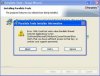
 
Here is a picture of just the error message- Not sure how to get an even better picture?

Also there is a ticket #14783

KMKW

Dear kevinw,

the image attached is of such a low resolution that it is hard to understand what is displayed there.
Error message is unreadable. Would you, please attach a picture with a bigger resolution?
Thank you
 

Attachments

  • Picture 11.jpg
    Picture 11.jpg
    19.5 KB · Views: 30
Last edited:
I created a ticket #622199 about copy paste not working in build 3522 and was told to upgrade to 3540 and that did not help much at all.. post upgrade copy paste from virtual to host machine worked one time(or maybe i was dreaming) but has since stopped working, I cannot even get copy paste within the virtual machine to work anymore!!! this is extremely frustrating, very very close to switching to vmware when will QA/testing be part of a release process @ Parallels.

So if you are considering upgrading to 3540 to get a fix for copy paste... I would try not put any money on it.
 
I just upgraded from 4.0.3522 to 4.0.3540, and I am seeing a tremendous performance improvement. I upgraded to 4.0 2 day ago and was about to give up given that I was getting periods where my entire MacBook Pro was becoming unresponsive. At this point, I have only been running for a few hours, but it appears that the guest OS boots much faster, applications on the guest OS run much faster, and I am not seeing the system hangs I was getting on 4.0.3522. I am running Vista Ultimate SP1 on a MacBook Pro, 2.4GHz Intel Core 2 Duo, with 2 GB RAM.
 
USB Controller Problems- Palm Hotsync

Had problems getting vm to recognize palm TX attached through USB with previous build. Can't get it to work at all under this current build. All it does is cycle through recognizing it, then dropping it, about every 8-10 seconds. Each time giving me a message about how it will automatically recognize it next time.

Really need this to work guys...I've got work to do. Please, get it fixed.
 
Had problems getting vm to recognize palm TX attached through USB with previous build. Can't get it to work at all under this current build. All it does is cycle through recognizing it, then dropping it, about every 8-10 seconds. Each time giving me a message about how it will automatically recognize it next time.

Really need this to work guys...I've got work to do. Please, get it fixed.
Josh,

Thanks for reporting - we will investigate this as soon as possible.
 
The new build provides no relief from the upgrade problems. My VM still hangs during step 2. Shifting to Manual informs me that the Floppy Disk cannot be located (no kidding!). Windows has an alert that the hardware installation has been drastically changed and Windows must be reactivated. The mouse and keyboard are frozen. The application then crashes.

Don't give me a bunch of troubleshooting options. You have enough information to fix these problems. You are not paying me to be part of you support staff—If you even have a real support staff.

You can inform me when you fix this junk, and I may try to upgrade again. For now, the process is not worth the effort.

Jack
 
I have been lurking/watching those who have had the BSOD A5 issue. I also have this error and unfortunately, did not do a backup. If there is a fix or repair utility I would like to be added to the list. Could I also be included in receiving this repair utility.
 
I have been lurking/watching those who have had the BSOD A5 issue. I also have this error and unfortunately, did not do a backup. If there is a fix or repair utility I would like to be added to the list. Could I also be included in receiving this repair utility.
jasonsilb,

Please check your PM.
 
Andrew

thank you for all of the answers and help
It is now day 4 since i installed p4.0 and i have tried the new build but to no avail. I tried to set up a new user on the mac to see if a new profile would allow the installer to run the tools install.

I am still stuck , has there been any progress on the 1306 error. What is the repair utility for will it fix this issue

Also, can i install my 3.0 again and have both 3.0 and 4 on the same drive so that can use parallels until a fix is found for this issue??

Peter

[email protected]
 
Updating the CPU driver

Known issues:

- Parallels Desktop may start consuming up to 100% CPU after setting 2 CPUs in a Windows virtual machine configuration. To troubleshoot this issue, update the CPU driver in the Windows guest OS.
How do you update the CPU driver in a Windows XP guest OS?
 
Thank You - but my mailbox is still empty

JoOppen,

We prepared repair utility for BSOD 0xA5 affected VMs. Please check your PMs for instructions.

Andrew, this is great news! Thank you for your effort. My mailbox is eagerly awaiting your hints. Did you already send it?

BTW, a right click on the VMs revealed that at least two of my three (non-PD3-compatible) backups contain my data. Would it be possible to create a new VM and to transfer the data from the old, corrupted VM to the newly build VM? I wouldn'd mind to create a new guest system as long as I can use some of the application data I generated recently. Some advise in that respect would be helpfull as well.

JoOppen
 
JoOppen
You can attach old disk to new VM, and retrieve data

bblitzmu
If it is Windows Vista
Please perform Windows Vista repair and install build 3540
 
Control Panel in Windows Vista will be repaired, as for services it depends what services do you mean


I have tried every possible combination of uninstalling PD4, running vista repair tool, reinstalling PD4, running vista repair tool in PD, etc...

My Control Panel still disappears when I start it. Furthermore, my installation of Vista needs to be reactivated and when I try to do so I get a Windows Error: 0x80070426. Service is not available.
 
Back
Top