
Install the app
How to install the app on iOS
Follow along with the video below to see how to install our site as a web app on your home screen.
Note: This feature may not be available in some browsers.
You are using an out of date browser. It may not display this or other websites correctly.
You should upgrade or use an alternative browser.
You should upgrade or use an alternative browser.
Parallels 20.x Unable to Run macOS VMs after macOS Update to 15.4
- Thread starter SinanK2
- Start date
ViniciusW1
Bit poster
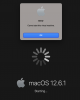
Same here. Unable to boot my macOS VM after trying to update to 15.4 on M2 Max, when I start the VM only a black screen appears.
I had another VM recently created and running 15.3, made a snapshot, tryed to update unsucessfully, went straight into recovery mode.
I had another VM recently created and running 15.3, made a snapshot, tryed to update unsucessfully, went straight into recovery mode.
ViniciusW1
Bit poster
Mine starts but it shows only a black screen and nothing more, regardless of how much time it stays on.
David_MPLS
Bit poster
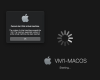
Mine tries to start, but only gets to the Parallels Window and says "Starting..." and that's as far as it gets.
I have a MB Pro 16 2023, M3 Pro running Sequoia 15.4. First time I've ever had a problem.
I sure hope you guys are getting this fixed ASAP. Please tell us you have a fix for this!!!
I have a MB Pro 16 2023, M3 Pro running Sequoia 15.4. First time I've ever had a problem.
I sure hope you guys are getting this fixed ASAP. Please tell us you have a fix for this!!!
Same issue here. What's the status on this?
Which is your issue, the first version I reported (and screenshotted), or the latter version reported on this thread?
I have an Macbook Pro M3, and a temporary fix for me was to shutdown my Mac, and after restart I could start parallells and my VM's again. But the issue came back today (after my Mac been idle during the night). One of my VM's did not respond and when I stopped the VM from Parallels, I got the same issue back trying to start the VM again.
I have an Macbook Pro M3, and a temporary fix for me was to shutdown my Mac, and after restart I could start parallells and my VM's again. But the issue came back today (after my Mac been idle during the night). One of my VM's did not respond and when I stopped the VM from Parallels, I got the same issue back trying to start the VM again.
Sadly rebooting doesn't help me at all.
So just to clarify you don't actually have any other macOS VMs running, do you?I get this
Sadly rebooting doesn't help me at all.
Did you also try a real shutdown instead of just reboot/restart?
Yes.Did you also try a real shutdown instead of just reboot/restart?