
Install the app
How to install the app on iOS
Follow along with the video below to see how to install our site as a web app on your home screen.
Note: This feature may not be available in some browsers.
You are using an out of date browser. It may not display this or other websites correctly.
You should upgrade or use an alternative browser.
You should upgrade or use an alternative browser.
"Parallels International GmbH" does not appear in Security & Privacy settings during v14 install
- Thread starter LewInVT
- Start date
Hello,
here is one solution I found. One reason for this behaviour may be that Parallels or macOS is trying to get some information regarding license or something else from the parallels servers. We have activated SSL deep packet inspection in our firewall. And the firewall is using a privatly signed Root CA SSL certificate to recrypt the SSL traffic. Parallels seems to not use the private Root CA certificate stored in macOS system keyring for verification.
After deactivating SSL deep inspection during parallels first start after installation/update everything worked fine. Parallels is starting. No message regarding any kernel extension.
here is one solution I found. One reason for this behaviour may be that Parallels or macOS is trying to get some information regarding license or something else from the parallels servers. We have activated SSL deep packet inspection in our firewall. And the firewall is using a privatly signed Root CA SSL certificate to recrypt the SSL traffic. Parallels seems to not use the private Root CA certificate stored in macOS system keyring for verification.
After deactivating SSL deep inspection during parallels first start after installation/update everything worked fine. Parallels is starting. No message regarding any kernel extension.
This was my problem as well. I am connected via a corporate VPN all day long and was getting this behavior after updating. Had to jump off the VPN, start parallels on my local network. After starting that first time it works great on the VPN.Hello,
here is one solution I found. One reason for this behaviour may be that Parallels or macOS is trying to get some information regarding license or something else from the parallels servers. We have activated SSL deep packet inspection in our firewall. And the firewall is using a privatly signed Root CA SSL certificate to recrypt the SSL traffic. Parallels seems to not use the private Root CA certificate stored in macOS system keyring for verification.
After deactivating SSL deep inspection during parallels first start after installation/update everything worked fine. Parallels is starting. No message regarding any kernel extension.
Hello,
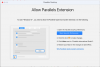
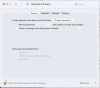
I encounter the same problem. I am running MacOS Big Sur (11.2.3) and I am not using VPN (internet works fine). I have Parallels 16.1.3 installed. When I start the Parallels Desktop App, I see the window with the Windows10 button. I click on it and after a short while a window pops up that tells me that I need to allow the Parallels Hypervisor System Extension (screenshot attached). I then click the blue button to open the Security & Privacy details of my system preferences. I see no allo button there (screenshot attached).
What could be the issue and how can I solve it without digging deep into my operating system?
Thanks!
Dominik
I encounter the same problem. I am running MacOS Big Sur (11.2.3) and I am not using VPN (internet works fine). I have Parallels 16.1.3 installed. When I start the Parallels Desktop App, I see the window with the Windows10 button. I click on it and after a short while a window pops up that tells me that I need to allow the Parallels Hypervisor System Extension (screenshot attached). I then click the blue button to open the Security & Privacy details of my system preferences. I see no allo button there (screenshot attached).
What could be the issue and how can I solve it without digging deep into my operating system?
Thanks!
Dominik
Attachments
I solved the above issue. I found this solution by DynDuo:
- Restarted my computer in recovery mode (Cmd-r)
- Start the "utilities" (which is not one of the four choices offered prominently in the middle of the screen but hidden in the menu bar)
- Choose Terminal
- Enter "csrutil disable"
- Restart the computer
CharlesD13
Bit poster
has this issues been fixed yet I'm having the same issues there no button for me to pressYou can refer to this article to know the cause of this issue. For now, going to the recovery and add kext is the best resolution.
brconflict
Bit poster
This issue has reared its ugly head again in Monterey. Same issue. "Allow Parallels Extension" appears, but nothing is found to approve or permit (that hasn't been already). Reboot didn't fix.
Hi, This work for me.I solved the above issue. I found this solution by DynDuo:
Because this disables an essential security feature of my mac, this is really not a viable solution and I would like to see Parallels step in here and offering a proper solution.
- Restarted my computer in recovery mode (Cmd-r)
- Start the "utilities" (which is not one of the four choices offered prominently in the middle of the screen but hidden in the menu bar)
- Choose Terminal
- Enter "csrutil disable"
- Restart the computer
MacOS Monterey ver.12.4
Parallels for desktop 17.1.3
DebasmitaM
Forum Maven
Hello, great. Please reach us back for any further queries.Hi, This work for me.
MacOS Monterey ver.12.4
Parallels for desktop 17.1.3
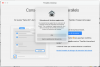
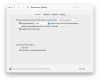
Hi, I've the same issue in Monterey. When I try to start a VM, the Updated System Extension message appears, asking me to open the Security panel and confirm "Parallels International GmbH".
But the Security pane doesn't show the name of the developer and the Allow button. I've restarted the Mac. There is no antivirus software running. Parallels has worked fine up untile before upgrading to Monterey.
I'm locked out of two essential programs I need to work. Please help!
Paolo
But the Security pane doesn't show the name of the developer and the Allow button. I've restarted the Mac. There is no antivirus software running. Parallels has worked fine up untile before upgrading to Monterey.
I'm locked out of two essential programs I need to work. Please help!
Paolo
I've checked the permissions with PermissionScanner, and I found that the following files can't be changed, or are locked:
/Library/Preferences/Parallels [ Owner root
  Permissions 755 ].
/Library/Preferences/Parallels/dispatcher.desktop.xml [ Owner root Permissions 644 ].
/Library/Preferences/Parallels/vmdirectorylist.desktop.xml [ Owner root Permissions 644 ].
/Library/Preferences/Parallels/parallels_dhcp_leases [ Owner root Permissions 644 ].
/Library/Preferences/Parallels/parallels-desktop.loc [ Owner root Permissions 644 ].
/Library/Preferences/Parallels/network.desktop.xml [ Owner root Permissions 644 ].
/Library/Preferences/Parallels/licenses.json [ Owner root Permissions 644 ].
/Library/Preferences/Parallels/Aliases/{72b1b0d8-4e99-4eba-86aa-52a26e1a8a72}.{7197dc48-a5ea-4db9-8230-471a86d5621c}_alias [ Owner root Permissions 644 ].
/Library/Preferences/Parallels/Aliases/{6ed69b6d-77bc-4af1-9b1e-478f134847d4}.{7197dc48-a5ea-4db9-8230-471a86d5621c}_alias [ Owner root Permissions 644 ].
This, even after the permission repair and OS reinstall I described above. Maybe this is where the problem resides?
Paolo
/Library/Preferences/Parallels [
Owner root Permissions 755 ]./Library/Preferences/Parallels/dispatcher.desktop.xml [
Owner root Permissions 644 ]./Library/Preferences/Parallels/vmdirectorylist.desktop.xml [
Owner root Permissions 644 ]./Library/Preferences/Parallels/parallels_dhcp_leases [
Owner root Permissions 644 ]./Library/Preferences/Parallels/parallels-desktop.loc [
Owner root Permissions 644 ]./Library/Preferences/Parallels/network.desktop.xml [
Owner root Permissions 644 ]./Library/Preferences/Parallels/licenses.json [
Owner root Permissions 644 ]./Library/Preferences/Parallels/Aliases/{72b1b0d8-4e99-4eba-86aa-52a26e1a8a72}.{7197dc48-a5ea-4db9-8230-471a86d5621c}_alias [
Owner root Permissions 644 ]./Library/Preferences/Parallels/Aliases/{6ed69b6d-77bc-4af1-9b1e-478f134847d4}.{7197dc48-a5ea-4db9-8230-471a86d5621c}_alias [
Owner root Permissions 644 ].This, even after the permission repair and OS reinstall I described above. Maybe this is where the problem resides?
Paolo
Finally found a workaround, even if I don't know how satisfactory - I changed the hypervisor to Apple's, both for my Windows 10 and MacOS Sierra VMs. They started, and seem to work fine.
I can breathe, and can go on with my job. Yet, I would like to solve this issue. Parallels defaults to their hypervisor, so I presume it should be the better one. Please don't let this thread end here!
Paolo
I can breathe, and can go on with my job. Yet, I would like to solve this issue. Parallels defaults to their hypervisor, so I presume it should be the better one. Please don't let this thread end here!
Paolo
(I'm sorry to have to add posts, but there is no way to edit the older ones).
Running the Apple hypervisor doesn't seem to give the same results. For example, I can't run some InDesign scripts that worked flawlessly with the Parallels hypervisor. Also, New/edited folders are not immediately recognized in the VM.
Paolo
Running the Apple hypervisor doesn't seem to give the same results. For example, I can't run some InDesign scripts that worked flawlessly with the Parallels hypervisor. Also, New/edited folders are not immediately recognized in the VM.
Paolo
Contrary to what I believed, it looks like Parallels themselves suggest the use of Apple's hypervisor in normal usage (at least, this was trued with PD 16):
https://www.parallels.com/blogs/system-extensions-big-sur/
So, it looks like I can ignore the Parallel's one. At the same time, I think this issue has to be solved.
Paolo
https://www.parallels.com/blogs/system-extensions-big-sur/
So, it looks like I can ignore the Parallel's one. At the same time, I think this issue has to be solved.
Paolo