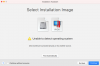
"Unable to Detect Operating system" error when trying to install Windows 10 Client ARM64 Insider Pre

MattB20

Bit poster
I have a M1 Mac Mini, Big Sur 11.3.1, Parallels 16.5 updated as of 5/10/21 and downloaded Windows 10 Client ARM64 Insider Preview - Build 21354, which is the only build I can find to download on the https://www.microsoft.com/en-us/software-download/windowsinsiderpreviewARM64 site.
When I point the Parallels install at the VHDX file I get "Unable to Detect Operating system". I have tried re-downloading the file and I still get the error.
Please help.

 

Attachments

  • Screen Shot 2021-05-10 at 9.15.24 AM.png
    Screen Shot 2021-05-10 at 9.15.24 AM.png
    18.2 KB · Views: 29
  • Screen Shot 2021-05-10 at 9.14.53 AM.png
    Screen Shot 2021-05-10 at 9.14.53 AM.png
    84.7 KB · Views: 29
To anyone who sees! I stopped trying to use the App Store version of parallels and downloaded the software straight off the website and its working!
That was a perfect solution for my struggles. Tried to install Win11 on AppStore version with both self-downloaded image and manually downloaded image file, both failed creating unattended image and other steps. Finally removed AppStore version and downloaded the installer from Parallels download site, and suddenly the installer worked as a charm.
 
Back
Top