Jacques2101
Bit poster
Hi, I am new to Parallels and just installed a test version.
I noticed that inside windows I do not have access to special caractères. For example:
on Mac '{' = <Option + (> but on windows nothing. Same with }, [, ]...
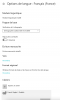
I have configured keyboard on windows as French apple keyboard (cf picture joined).
Any ideas to help me ?
I suppose that it is a very classical problem.
I noticed that inside windows I do not have access to special caractères. For example:
on Mac '{' = <Option + (> but on windows nothing. Same with }, [, ]...
I have configured keyboard on windows as French apple keyboard (cf picture joined).
Any ideas to help me ?
I suppose that it is a very classical problem.