Install the app
How to install the app on iOS
Follow along with the video below to see how to install our site as a web app on your home screen.
Note: This feature may not be available in some browsers.
You are using an out of date browser. It may not display this or other websites correctly.
You should upgrade or use an alternative browser.
You should upgrade or use an alternative browser.
Prevent MP4 from opening in VM
- Thread starter JamieS73
- Start date
-
- Tags
- default apps mp4 quicktime
Arun@Parallels
Parallels Support
I checked the default setting in the right-click menu, and it was still set to use Quicktime. The file still opened in the VM. I reinstalled Parallels, no change. I checked the "Open with:" field in Get Info which also was set to Quicktime. I clicked "Change All..." and apparently settings were updated because now it works correctly.Hi @JamieS73 , please re check the default program on your mac and check if it is set to Quicktime (mac) , if the issue still persists, please try to uninstall and reinstall Parallels Desktop for mac.
S
Sathiya@Parallels
Nice to know that it works as expected now. Please post again for additional queries.I checked the default setting in the right-click menu, and it was still set to use Quicktime. The file still opened in the VM. I reinstalled Parallels, no change. I checked the "Open with:" field in Get Info which also was set to Quicktime. I clicked "Change All..." and apparently settings were updated because now it works correctly.
Hi,
I'm having this same issue. Everything was fine until i opened some files off a microsd card in windows while I was in bootcamp. When I came back to my mac side I tried opening up some other videos and now every time I try to open a video file it launches parallels and opens in the windows photos app. Also all of my video files have the parallels icon next to their name. I have tried setting my default to preview but it does not work. What can I do to fix this? Thank you
I'm having this same issue. Everything was fine until i opened some files off a microsd card in windows while I was in bootcamp. When I came back to my mac side I tried opening up some other videos and now every time I try to open a video file it launches parallels and opens in the windows photos app. Also all of my video files have the parallels icon next to their name. I have tried setting my default to preview but it does not work. What can I do to fix this? Thank you

Maria@Parallels
Problem solver
Hello, did you try the solution provided by @JamieS73 above?Hi,
I'm having this same issue. Everything was fine until i opened some files off a microsd card in windows while I was in bootcamp. When I came back to my mac side I tried opening up some other videos and now every time I try to open a video file it launches parallels and opens in the windows photos app. Also all of my video files have the parallels icon next to their name. I have tried setting my default to preview but it does not work. What can I do to fix this? Thank you
This worked: I checked the "Open with:" field in Get Info which also was set to Quicktime. I clicked "Change All..."
However, I have been plagued and ANNOYED by this behavior by Parallels - to take over my file opening preferences without my permission. I've NEVER told Parallels to wake up, start Windows, and use the awful Windows Media Player when I click on an MP4 file on my Mac. Wasted SOOOO much time waiting for Windows to boot each time I forgot about this bad (and unwanted) file association that I didn't ask for.
Parallels, dev team, you might look to this. "Default behavior" can be a terrible tyranny.
However, I have been plagued and ANNOYED by this behavior by Parallels - to take over my file opening preferences without my permission. I've NEVER told Parallels to wake up, start Windows, and use the awful Windows Media Player when I click on an MP4 file on my Mac. Wasted SOOOO much time waiting for Windows to boot each time I forgot about this bad (and unwanted) file association that I didn't ask for.
Parallels, dev team, you might look to this. "Default behavior" can be a terrible tyranny.

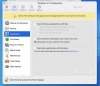
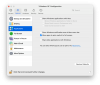
Where did you find this option in the preferences?I was also annoyed by this, what did the trick for me was disabling "Share Windows applications with Mac"

Right-click on Windows icon in the Dockmaddening, cannot find this! drives me nuts.
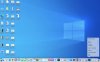
Select "Control Center" from top of pop-up menu.
Click on "Gear" icon.

Select "Options" at the top and then "Applications".