Hello,
A very loooong time ago, I imported my bootcamp partition into Parallels Desktop for Mac, version I-don't-remember.
After quite some PDM updates, I now have situation, where I want to expand the C: drive.
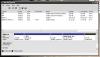
After reading almost all posts about non-extendable/expandable Windows XP and Bootcamp partitions, and trying lots of KB-articles to remove cq. resize partitions, using minitool, diskpart, prl_disk_tool, etc. which all only resulted in a blue-screen at startup, I now start a new topic in the hope that Parallels, or someone else, has a solution for my situation (see screenshot):
View attachment 15355
D: is not formatted, so Windows tells me when I select it in Explorer's folders pane, and when I do not click anywhere else, after a few seconds Windows XP crashes with a blue screen.
It seems my VM boots from C: but when I delete D: or the other partitions, no booting is possible (blue screen).
After deleting the partitions, I also tried to change the partition number in boot.ini (after C: became eventually prtition no. 2) but that only resulted in some .dll missing error.
Since I have a backup of the VM, I copied it back and tried another way - about 4 or 5 times with different tools.
My goal is to have just C: as a self-expanding disk.
In the configuration of this VM, it already says it's self-expanding, with a minimum of 699 GB.
But in reality, well, it isn't.
What's the solution?
- -
Thanks,
Marc Vos
A very loooong time ago, I imported my bootcamp partition into Parallels Desktop for Mac, version I-don't-remember.
After quite some PDM updates, I now have situation, where I want to expand the C: drive.
After reading almost all posts about non-extendable/expandable Windows XP and Bootcamp partitions, and trying lots of KB-articles to remove cq. resize partitions, using minitool, diskpart, prl_disk_tool, etc. which all only resulted in a blue-screen at startup, I now start a new topic in the hope that Parallels, or someone else, has a solution for my situation (see screenshot):
View attachment 15355
D: is not formatted, so Windows tells me when I select it in Explorer's folders pane, and when I do not click anywhere else, after a few seconds Windows XP crashes with a blue screen.
It seems my VM boots from C: but when I delete D: or the other partitions, no booting is possible (blue screen).
After deleting the partitions, I also tried to change the partition number in boot.ini (after C: became eventually prtition no. 2) but that only resulted in some .dll missing error.
Since I have a backup of the VM, I copied it back and tried another way - about 4 or 5 times with different tools.
My goal is to have just C: as a self-expanding disk.
In the configuration of this VM, it already says it's self-expanding, with a minimum of 699 GB.
But in reality, well, it isn't.
What's the solution?
- -
Thanks,
Marc Vos