Parallels 12 Crash On Launch

My Parallels Desktop 12 is crashing on launch


  • Total voters
    11

VW5g7Z4q

Bit poster
Parallels' Developer Certificate which is used for the code signature for Parallels Desktop 12 expired Monday, October 22, 2018 at 12:11:00 AM UTC.
This is causing Parallels Desktop 12 to crash on launch with the following:

Exception Type: EXC_CRASH (Code Signature Invalid)
Exception Codes: 0x0000000000000000, 0x0000000000000000
Exception Note: EXC_CORPSE_NOTIFY
 
Parallels' Developer Certificate which is used for the code signature for Parallels Desktop 12 expired Monday, October 22, 2018 at 12:11:00 AM UTC.
This is causing Parallels Desktop 12 to crash on launch with the following:

Exception Type: EXC_CRASH (Code Signature Invalid)
Exception Codes: 0x0000000000000000, 0x0000000000000000
Exception Note: EXC_CORPSE_NOTIFY
Hi @VW5g7Z4q, please generate a report ID and quit Parallels Desktop 12 and then go to Finder--> Application--> Parallels Desktop then ( Right click and move to trash ). Go to Disk utility--> Macintosh HD and run ' First Aid '. restart the Mac computer completely and then reinstall Parallels Desktop 12 < www.parallels.com/directdownload/pd12 > and check with it. if the issue still persists then generate a Technical Report ID (refer to http://bit.ly/1lUhbwK for assistance) please follow the last step using terminal, while the issue occurs/the error message is being displayed (very important) and reply with the report ID number. We'll then investigate.
 
Paul,
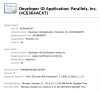
Please see the image of the developer certificate used to sign Parallels Desktop 12 below:
pdevcert.png
You can see the expiration date is Monday October 22, 2018.
The crash on launch is being caused by the expired certificate. This can be verified by self-signing Parallels Desktop and then launching it. The app will then function, but this is not the correct solution to the problem.

Create a self-signed certificate:

1. Open Keychain Access (/Applications/Utilities/Keychain Access)
2. Select "Keychain Access > Certificate Assistant > Create a Certificate..." and create a self-signed certificate (use a name without spaces and change "Certificate type" to "Code Signing")
3. Find the newly created cert in the list and select it, then do File > Get Info on that certificate
4. select "Code Signing > Always Trust"
5. In terminal, type: sudo codesign -s <CERTIFICATE_NAME_HERE> -f /Applications/Parallels\ Desktop.app/
check "Let me override defaults" in order to enter a date a few years into the future - otherwise its default is one year.

Parallels will now launch without crashing and function.
 
Paul,
Please see the image of the developer certificate used to sign Parallels Desktop 12 below:
View attachment 14321
You can see the expiration date is Monday October 22, 2018.
The crash on launch is being caused by the expired certificate. This can be verified by self-signing Parallels Desktop and then launching it. The app will then function, but this is not the correct solution to the problem.

Create a self-signed certificate:

1. Open Keychain Access (/Applications/Utilities/Keychain Access)
2. Select "Keychain Access > Certificate Assistant > Create a Certificate..." and create a self-signed certificate (use a name without spaces and change "Certificate type" to "Code Signing")
3. Find the newly created cert in the list and select it, then do File > Get Info on that certificate
4. select "Code Signing > Always Trust"
5. In terminal, type: sudo codesign -s <CERTIFICATE_NAME_HERE> -f /Applications/Parallels\ Desktop.app/
check "Let me override defaults" in order to enter a date a few years into the future - otherwise its default is one year.

Parallels will now launch without crashing and function.
Hi @VW5g7Z4q, thanks for the solution! It's really helpful! We would love to have customers like you!!
 
This morning I tried to start Parallels 12 on two of my machines - one Mac Pro laptop running OS X 10.13.6 and one Mac Mini running OS X 10.14. I get the same error as shown above when looking at the 'send report' window. I tried to create a self signed certificate but that didn't work - probably my fault as I couldn't view the example certificate from VW5g7Z4q. Is there any patch for this yet? I do have Parallels 12 running on a 2013 Mac Pro with OS X 10.14 and it loads and executes correctly (for now).
 
This morning I tried to start Parallels 12 on two of my machines - one Mac Pro laptop running OS X 10.13.6 and one Mac Mini running OS X 10.14. I get the same error as shown above when looking at the 'send report' window. I tried to create a self signed certificate but that didn't work - probably my fault as I couldn't view the example certificate from VW5g7Z4q. Is there any patch for this yet? I do have Parallels 12 running on a 2013 Mac Pro with OS X 10.14 and it loads and executes correctly (for now).
Hello RobertL19, Kindly quit Parallels Desktop 12 and then go to Finder--> Application--> Parallels Desktop then ( Right click and move to trash ). Go to Disk utility--> Macintosh HD and run ' First Aid '. restart the Mac computer completely and then reinstall Parallels Desktop 12 < www.parallels.com/directdownload/pd12 > and check with it. if the issue still persists then generate a Technical Report ID (refer to http://bit.ly/1lUhbwK for assistance) please follow the last step using terminal, while the issue occurs/the error message is being displayed (very important) and reply with the report ID number.
 
Hi @VW5g7Z4q !
Thank you very much for your post. I think I have the exact same problem...I tried it with the new certificate but this is what I get:
Gabrielas-MBP:~ Gabriela$ sudo codesign -s <GABPARALLELS> -f /Applications/Parallels\ Desktop.app/
-bash: GABPARALLELS: No such file or directory
Probably I am doing something wrong..:S Because the certificate does appear in the list and so on...
Thank you very much!!
 
Hi @VW5g7Z4q !
Thank you very much for your post. I think I have the exact same problem...I tried it with the new certificate but this is what I get:
Gabrielas-MBP:~ Gabriela$ sudo codesign -s <GABPARALLELS> -f /Applications/Parallels\ Desktop.app/
-bash: GABPARALLELS: No such file or directory
Probably I am doing something wrong..:S Because the certificate does appear in the list and so on...
Thank you very much!!
Hello GabrielaB1, Kindly quit Parallels Desktop 12 and then go to Finder--> Application--> Parallels Desktop then ( Right click and move to trash ). Go to Disk utility--> Macintosh HD and run ' First Aid '. restart the Mac computer completely and then reinstall Parallels Desktop 12 < www.parallels.com/directdownload/pd12 > and check with it. if the issue still persists then generate a Technical Report ID (refer to http://bit.ly/1lUhbwK for assistance) please follow the last step using terminal, while the issue occurs/the error message is being displayed (very important) and reply with the report ID number. We'll then investigate.
 
Hi @VW5g7Z4q !
Thank you very much for your post. I think I have the exact same problem...I tried it with the new certificate but this is what I get:
Gabrielas-MBP:~ Gabriela$ sudo codesign -s <GABPARALLELS> -f /Applications/Parallels\ Desktop.app/
-bash: GABPARALLELS: No such file or directory
Probably I am doing something wrong..:S Because the certificate does appear in the list and so on...
Thank you very much!!
Try removing the "<>". Those are just to indicate where the variable goes. So instead of writing <GABPARALLELS>, just write GABPARALLELS. I Assume that "GABPARALLELS" is the name you gave your certificate.
 
Paul,
Please see the image of the developer certificate used to sign Parallels Desktop 12 below:
View attachment 14321
You can see the expiration date is Monday October 22, 2018.
The crash on launch is being caused by the expired certificate. This can be verified by self-signing Parallels Desktop and then launching it. The app will then function, but this is not the correct solution to the problem.

Create a self-signed certificate:

1. Open Keychain Access (/Applications/Utilities/Keychain Access)
2. Select "Keychain Access > Certificate Assistant > Create a Certificate..." and create a self-signed certificate (use a name without spaces and change "Certificate type" to "Code Signing")
3. Find the newly created cert in the list and select it, then do File > Get Info on that certificate
4. select "Code Signing > Always Trust"
5. In terminal, type: sudo codesign -s <CERTIFICATE_NAME_HERE> -f /Applications/Parallels\ Desktop.app/
check "Let me override defaults" in order to enter a date a few years into the future - otherwise its default is one year.

Parallels will now launch without crashing and function.
Thank you very much! This resolved my issue without having to reinstall.
 
Paul,
Please see the image of the developer certificate used to sign Parallels Desktop 12 below:
View attachment 14321
You can see the expiration date is Monday October 22, 2018.
The crash on launch is being caused by the expired certificate. This can be verified by self-signing Parallels Desktop and then launching it. The app will then function, but this is not the correct solution to the problem.

Create a self-signed certificate:

1. Open Keychain Access (/Applications/Utilities/Keychain Access)
2. Select "Keychain Access > Certificate Assistant > Create a Certificate..." and create a self-signed certificate (use a name without spaces and change "Certificate type" to "Code Signing")
3. Find the newly created cert in the list and select it, then do File > Get Info on that certificate
4. select "Code Signing > Always Trust"
5. In terminal, type: sudo codesign -s <CERTIFICATE_NAME_HERE> -f /Applications/Parallels\ Desktop.app/
check "Let me override defaults" in order to enter a date a few years into the future - otherwise its default is one year.

Parallels will now launch without crashing and function.

Through searching multiple forums, I found that your terminal code above should have quotes (") instead of the characters you have listed (<>) to get mine to work (can't explain why but that's what I found, because your characters (<>) made terminal output "-bash: CERTIFICATE_NAME: no such file or directory") but once I replaced these and ran the command:
sudo codesign -s "parallelsCertificate" -f /Applications/Parallels\ Desktop.app

terminal output:
/Applications/Parallels Desktop.app: replacing existing signature
/Applications/Parallels Desktop.app: resource fork, Finder information, or similar detritus not allowed

I am not sure what the issue is, but my certificate will not sign so any help would be much appreciated. Thank you!
 
Last edited:
Through searching multiple forums, I found that your terminal code above should have quotes (") instead of the characters you have listed (<>) to get mine to work (can't explain why but that's what I found, because your characters (<>) made terminal output "-bash: CERTIFICATE_NAME: no such file or directory") but once I replaced these and ran the command:
sudo codesign -s "parallelsCertificate" -f /Applications/Parallels\ Desktop.app

terminal output:
/Applications/Parallels Desktop.app: replacing existing signature
/Applications/Parallels Desktop.app: resource fork, Finder information, or similar detritus not allowed

I am not sure what the issue is, but my certificate will not sign so any help would be much appreciated. Thank you!

i ve got same issue with out after i try to replace Cert so anyone who know the solution pls help Thank you very much
 
Back
Top