I had posted on this a few days ago on an old thread, but thought I might start a new one in case no one is paying attention to the other one.
I need to resize my hard disk, but when I attempted to edit the disk in Parallels desktop, I got the error message:
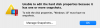
"Unable to edit the hard disk properties because it has one or more snapshots."
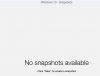
When this first happened, I followed the instructions in this forum to delete the snapshot, then went to "Manage Snapshots" and confirmed that in fact I have no snapshots, but after having restarted my Mac, I still get the same error message. How do I deal with this?
I'm running Windows 10 on Parallels Desktop 12, which i just recently installed. Other than this, everything seems to work fine.
I need to resize my hard disk, but when I attempted to edit the disk in Parallels desktop, I got the error message:
"Unable to edit the hard disk properties because it has one or more snapshots."
When this first happened, I followed the instructions in this forum to delete the snapshot, then went to "Manage Snapshots" and confirmed that in fact I have no snapshots, but after having restarted my Mac, I still get the same error message. How do I deal with this?
I'm running Windows 10 on Parallels Desktop 12, which i just recently installed. Other than this, everything seems to work fine.