
Install the app
How to install the app on iOS
Follow along with the video below to see how to install our site as a web app on your home screen.
Note: This feature may not be available in some browsers.
You are using an out of date browser. It may not display this or other websites correctly.
You should upgrade or use an alternative browser.
You should upgrade or use an alternative browser.
I want to move Parallels desktop 10 to my new mac
- Thread starter scripzero
- Start date

kat
Product Expert
Hi scrip zero,
If you are looking for license information on Parallels website L
Parallels.com>log into my account>this will take you to your Dashboard>Under Parallels Desktop for Mac>legacy licenses you will find your old licenses there.
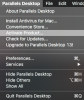
If you are referring to information on your mac, open parallels>about Parallels desktop>Account & licenses
If you are looking for license information on Parallels website L
Parallels.com>log into my account>this will take you to your Dashboard>Under Parallels Desktop for Mac>legacy licenses you will find your old licenses there.
If you are referring to information on your mac, open parallels>about Parallels desktop>Account & licenses

kat
Product Expert
Unfortunately I cannot, deactivate a license, and I no longer have Parallels 10 (I am using a somewhat newer version which gives me the ability to sign out) I think that there is a thread for this I will check and post a link (to that thread) you could also contact customer support.
kat
Product Expert
I believe that this would be the right thread for you: https://forum.parallels.com/threads/need-to-move-license-for-parallels-desktop-10-to-new-mac.341468/
We have reset the activation key. Please follow the instructions below:It's alright, I will try the other way
1. Quit Parallels Desktop, then try to activate after launching it again.
2. If you are still unable to activate, Open Terminal on the Mac and execute this command: prlsrvctl activate-license-online