
Mike Boreham
Pro
If you right click the .pvm file -> Show Package Contents, then right click the hdd file -> show package contents, you may see something like I have after a few months: 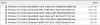
These can all be merged in a single smaller hds file using the Parallels Merge tool.
Open a Terminal window and type (or copy and paste):
prl_disk_tool merge --hdd
Then type one space
Then drag the hdd file (the one after the first 'show package contents' on the pvm file) into the Terminal window
Press enter, password etc
The merge tool will combine all the separate hds files into one smaller one.
In my example above the pvm file was reduced from 98 Gb to 81 Gb. I have often seen bigger reductions.
This situation arises from use of snapshots.
It is now a regular maintenance activity for me. It has never caused any problem for the VM.
I have not seen it recommended by Parallels, although I found the merge tool in a Parallels KB.
If you search the Parallels KB database for "merge" the above tool appears as the solution for a number of problems, but is never mentioned as a simple way of reducing the VM size.
These can all be merged in a single smaller hds file using the Parallels Merge tool.
Open a Terminal window and type (or copy and paste):
prl_disk_tool merge --hdd
Then type one space
Then drag the hdd file (the one after the first 'show package contents' on the pvm file) into the Terminal window
Press enter, password etc
The merge tool will combine all the separate hds files into one smaller one.
In my example above the pvm file was reduced from 98 Gb to 81 Gb. I have often seen bigger reductions.
This situation arises from use of snapshots.
It is now a regular maintenance activity for me. It has never caused any problem for the VM.
I have not seen it recommended by Parallels, although I found the merge tool in a Parallels KB.
If you search the Parallels KB database for "merge" the above tool appears as the solution for a number of problems, but is never mentioned as a simple way of reducing the VM size.