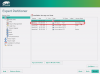
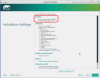
Question Summary: How do I tell Parallels Desktop 12 for Mac to create a new Linux VM with the UEFI (i.e., Unified Extensible Firmware Interface) and GPT, rather than with legacy BIOS and only MBR?
Background: As a newcomer to Linux, I wanted to learn bash (i.e., Bourne-Again Shell) and to practice using bash to administer a Linux VM. So I decided to create a new Linux VM on which I would learn bash and practice it.
I asked a friend which free distro had the most comprehensive documentation. He said "openSUSE". I chose to install openSUSE version Leap 42.1 for two reasons: (a) the alternative version, openSUSE 13.2, would not be maintained by openSUSE beyond the first quarter of the following year; and (b) Parallels Desktop 12 for Mac supported Leap 42.1, according to the PD12 for Mac User's Guide.
In reading about Leap 42.1, I learned about the advantages of UEFI and GPT (i.e., Globally unique identifier Partition Table). For me, chief among the advantages were these two:
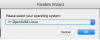
When I made this choice, I considered choosing SUSE Linux Enterprise instead. Why? Because version Leap 42.1 is a departure for openSUSE: Leap 42.1 is the first version of openSUSE that uses source from SUSE's commercial product SUSE Linux Enterprise. (See https://en.opensuse.org/Portal:Leap.) But I took a snapshot of the empty VM before trying to install Leap 42.1 on it. So if either my first installation or my first run fails, I can go back and reconfigure the VM as designed for SUSE Linux Enterprise, as shown in this image:
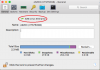
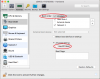
The second configuration choice was: Should I configure the VM to use EFI Boot? Here I chose to not select EFI Boot, because, I reasoned, the first boot would be from the installation DVD image, not from the hard drive, and I imagined the installation DVD would not have the UEFI boot code:
Then I used a Web search engine with a number of strings, to see if I could find any advice on how to make sure that a new Linux VM had UEFI. Although I found several Webpages giving advice for UEFI in Linux VMs under competing products such as VMware and VirtualBox, I could not find any advice for Parallels Desktop VMS, Linux, and UEFI. I also searched this Parallels Linux Guest forum, but the only posts I came up with were disappointing and discouraging: two were from Parallels Desktop ex-users in 2013. The first of these wrote, "Parallels clearly doesn't care about their linux users, so I dropped them. I have working UEFI ... with VirtualBox." The other wrote, "I switched to VMware. ... UEFI works, too."
So I am left wondering if, in 2016, Parallels has decided that it does, indeed, care about its Linux Guest users and will, indeed, support openSUSE Leap 42.1 -- as the PD12 for Mac User's Guide says it does -- with UEFI and GPT. And if Parallels will support openSUSE Leap 42.1, then how do I tell Parallels Desktop 12 for Mac to create a new Linux VM with the UEFI and GPT?
Background: As a newcomer to Linux, I wanted to learn bash (i.e., Bourne-Again Shell) and to practice using bash to administer a Linux VM. So I decided to create a new Linux VM on which I would learn bash and practice it.
I asked a friend which free distro had the most comprehensive documentation. He said "openSUSE". I chose to install openSUSE version Leap 42.1 for two reasons: (a) the alternative version, openSUSE 13.2, would not be maintained by openSUSE beyond the first quarter of the following year; and (b) Parallels Desktop 12 for Mac supported Leap 42.1, according to the PD12 for Mac User's Guide.
In reading about Leap 42.1, I learned about the advantages of UEFI and GPT (i.e., Globally unique identifier Partition Table). For me, chief among the advantages were these two:
- UEFI would allow me to boot Linux from disks greater than 2 TB in size that had been partitioned with the GPT.
- Using GPT would free me from MBR's limit of four primary partitions.
When I made this choice, I considered choosing SUSE Linux Enterprise instead. Why? Because version Leap 42.1 is a departure for openSUSE: Leap 42.1 is the first version of openSUSE that uses source from SUSE's commercial product SUSE Linux Enterprise. (See https://en.opensuse.org/Portal:Leap.) But I took a snapshot of the empty VM before trying to install Leap 42.1 on it. So if either my first installation or my first run fails, I can go back and reconfigure the VM as designed for SUSE Linux Enterprise, as shown in this image:
The second configuration choice was: Should I configure the VM to use EFI Boot? Here I chose to not select EFI Boot, because, I reasoned, the first boot would be from the installation DVD image, not from the hard drive, and I imagined the installation DVD would not have the UEFI boot code:
Then I used a Web search engine with a number of strings, to see if I could find any advice on how to make sure that a new Linux VM had UEFI. Although I found several Webpages giving advice for UEFI in Linux VMs under competing products such as VMware and VirtualBox, I could not find any advice for Parallels Desktop VMS, Linux, and UEFI. I also searched this Parallels Linux Guest forum, but the only posts I came up with were disappointing and discouraging: two were from Parallels Desktop ex-users in 2013. The first of these wrote, "Parallels clearly doesn't care about their linux users, so I dropped them. I have working UEFI ... with VirtualBox." The other wrote, "I switched to VMware. ... UEFI works, too."
So I am left wondering if, in 2016, Parallels has decided that it does, indeed, care about its Linux Guest users and will, indeed, support openSUSE Leap 42.1 -- as the PD12 for Mac User's Guide says it does -- with UEFI and GPT. And if Parallels will support openSUSE Leap 42.1, then how do I tell Parallels Desktop 12 for Mac to create a new Linux VM with the UEFI and GPT?
Attachments

Last edited: