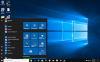
Windows 10 Default Browser

I also have Firefox and Chrome installed on my Mac but they don't appear in the virtual machine...wonder if we'll ever find out what's the problem...if I would know the registry keys I could at least make a work around by using a batch file in autostart....
The apps won't appear. The option will be open in Mac. Set that as your default and the file or link will open in your default Mac browser
 
seems that I could solve the problem on my Mac. I found this article https://is.gd/NDNRtB and switched from my local account to my Microsoft account. Again I changed the default browser from Edge to "open on Mac". After a restart Edge was again set for default browser :( so I logged out from my MS account and logged back into my local account. In the W10 settings, where I can change the default browser, Edge was no longer shown but it just said "select standard". But from the menu which offers Edge and "open in Mac" none of the two can be selected. So then I went to fiile associations. .html and .htm were already associated to Safari (Mac). Since there is no http or https offered in the list (probably cause this is not a file ending) I had the idea to change .url instead. So I set .url to Safari (Mac). What can I say? Even after a restart all urls are now still opened in Safari on Mac. I don't know if this is connected on my trials with the MS account or not. Probably only the change of the file association for .url would have done it alone. I will check this on my MacBook now...ok, I checked on my MacBook which has same installation and had same problem with the sticky Edge for default browser. Going to file associations and changing the setting for .url from "internet browser" to "Safari (Mac)" solved the problem immediately. I don't know why I did not do this right from the start...this sticky Edge browser made me blind...no need to take care of the default browser settings at all as long as the association for .url is connected to Safari on Mac. :)
 
Last edited:
Hello Guys, please be informed that Parallels Desktop 12 for Mac Hotfix 1 (12.0.1-41296) was released and the issue has been addressed. Please update Parallels Desktop to the latest build http://kb.parallels.com/123948 Latest version always available here: www.parallels.com/directdownload/pd12 Please note that Parallels Tools also needs to be updated (Actions > Update Parallels Tools) and let us know how it works. Thanks!
 
I don't know whether it fixed it cause I already fixed it myself earlier as described in my previous post 8-) Since I overlooked that the hotfix is for Parallels 12 while I was still on Parallels 11 I now unintentionally installed Parallels 12. As I wasn't sure if I can simply interrupt the installtion without facing troubles later I bought a new license key while I would have probably waited with the upgrade until Mac OS comes out in autum. So @PaulChris@Parallels is nominated for employee of the week by Parallels sales dept. ;) I am now facing problems installing Parallels Toolbox but I will check the forum first before I open a new thread on that...
 
Hello Guys, please be informed that Parallels Desktop 12 for Mac Hotfix 1 (12.0.1-41296) was released and the issue has been addressed. Please update Parallels Desktop to the latest build http://kb.parallels.com/123948 Latest version always available here: www.parallels.com/directdownload/pd12 Please note that Parallels Tools also needs to be updated (Actions > Update Parallels Tools) and let us know how it works. Thanks!
Is there any plan on fixing this on Parallels 11? I actually upgraded from Parallels 10 to 11 because I ran into this exact same issue after upgraded to W10 (default web browser will reset when restarting the VM), and I'm going to be royally pissed if I have to upgrade to 12 when there are literally no new features that I care about, just to get this fixed.
 
The issue is with windows. Change your default file associations like martin posted above. Be sure to set safari or open in mac to the url associations also not just http and https. This should get it working.
 
No, it's not with Windows. I've tried changing them to "Open in Mac", using both the Default apps section in Settings and by specific protocol / file extension, and they always reset to Edge upon restart. If I change them to another Windows VM browser (Chrome) though, it sticks.

And again, I ran into this exact same issue with the initial release of W10 on Parallels 10, and upgrading to 11, while running the exact same Windows install, resolved it. So the issue is how the "Open in Mac" (which was actually called something else in Parallels 10, though I can't remember what) is implemented.
 
Last edited by a moderator:
@KaiS1 actually there is NO need for any fix at all for version 11. You can fix it yourself as described above in my posting (#23) and you can stay with version 11 as long as you like...
 
No the issue is how edge handless this problem in Windows 10. If you block edge from running it won't happen anymore
Then why does it not happen if you try setting another (native) browser as the default? As I've said, if I set it as Chrome, the settings stick without issue. It's only when set to "Open in Mac" that it breaks.

But most people don't want to block it completely. Have you tried setting safari instead of open in Mac?
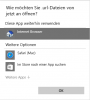
Safari is not an option, in both sense of the phrase - I do not want to use Safari (I use Chrome on OS X), and it does not show up. See below image.

@KaiS1 actually there is NO need for any fix at all for version 11. You can fix it yourself as described above in my posting (#23) and you can stay with version 11 as long as you like...
There is no option to set the .URL file association with anything other than "Internet Browser". See below image.

These are the options I have when trying to change the default app through the various different ways W10 allows you to.
m55d5cO.jpg
 
I preassume that you made all necessary adjustments in Parallels settings as well (Internet & e-mail > open in Mac) and set Chrome for default browser in OS X. I have no explanation why for you not even Safari is offered to be associated with ".url". As mentioned above for me it was offered even before using the fix. Probably interesting to know is that after applying the fix (for Parallels 12) the file association for ".url" is "internet browser" again (not Safari). I just found out now (see screenshot below -german-). So even if Safari is still offered after the fix, the standard setting is back to "internet browser" while urls are properly opened on Mac.

Sceenshot.png
 
because windows 10 uses a hash algorithm to check default file extensions. The mac file extensions sometimes do not Work right with the windows security features. This is why i recommend not setting your default to "Open in MAC" but to "Safari (MAC)" Or "FireFox (MAC)". You see the difference in the setting? This natively sets the Program instead of setting it to the Mac controlled default which doesn't play well with windows security on some systems. Why im not exactly sure because i do not have the source for the application. If you do not see these options in you defaults please make sure that parallels shared applications shows up in windows.
If it does not go to you VM configuration < Options < Applications < Share windows applications with mac checked
Share mac applications with windows checked.
Also be sure you are logged into windows as an administrator.
 

Attachments

  • Screen Shot 2016-09-03 at 2.00.28 PM.png
    Screen Shot 2016-09-03 at 2.00.28 PM.png
    250.2 KB · Views: 3
Last edited:
Here is a Screenshot of the parallels shared applications folder under the windows 10 start menu.
See if your mac applications (Chrome for OS X) are available here.
 

Attachments

  • Screen Shot 2016-09-03 at 2.08.52 PM.png
    Screen Shot 2016-09-03 at 2.08.52 PM.png
    399.6 KB · Views: 9
  • Screen Shot 2016-09-03 at 2.13.09 PM.png
    Screen Shot 2016-09-03 at 2.13.09 PM.png
    193.8 KB · Views: 2
seems there is a problem here with attached files/pictures...at least for me using Safari. Can't always open them. An the screenshot that I attached to posting #36 is no longer available...
 
click the link to open them and then after they open in a new window wait about 5 seconds and click refresh in your browser. This is how i have to sometimes get them to show. Thanks martin9 for pointing that out.
 
Back
Top