
I am running Parallels Build 8.0.18615 on OS X 10.8.5. I am migrating an old Windows XP SP3 computer (Dell Optiplex GX280) via the network using Parallels Transporter, and I cannot get the keyboard/mouse to work. The VM is not hung; the screensaver kicks in, I can shutdown cleanly via the menu options. I have zero control over keyboard/mouse once windows boots. I can use keyboard to start safe mode, but I have no keyboard use in there either. Things I have tried (multiple migration attempts):
1) Booting into safe mode
2) Running SFC.EXE /SCANNOW prior to migration (Article ID: 8246)
3) I tried installing Parallels tools prior to migration (Article ID: 112609)
4) I tried connecting keyboard/mouse directly to the VM.
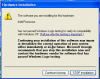
Basically, when I turn up the VM it detects a bunch of hardware changes, but stops when it gets to installing "Intel Processor" saying it hasn't passed Windows Logo compatibility - see attached screenshot. I have no way of continuing past this point. My old computer has an Intel processor, Pentium 4 2.4Ghz w/hyperthreading enabled. I thought about disabling Driver Signing in XP prior to migration to prevent this warning from coming up, but its already disabled.
Any ideas whats wrong?
1) Booting into safe mode
2) Running SFC.EXE /SCANNOW prior to migration (Article ID: 8246)
3) I tried installing Parallels tools prior to migration (Article ID: 112609)
4) I tried connecting keyboard/mouse directly to the VM.
Basically, when I turn up the VM it detects a bunch of hardware changes, but stops when it gets to installing "Intel Processor" saying it hasn't passed Windows Logo compatibility - see attached screenshot. I have no way of continuing past this point. My old computer has an Intel processor, Pentium 4 2.4Ghz w/hyperthreading enabled. I thought about disabling Driver Signing in XP prior to migration to prevent this warning from coming up, but its already disabled.
Any ideas whats wrong?
Last edited:

