Primary hard drive on Mac failed and had to rebuild from a time machine backup.
Have Parallels 9 running Windows 7 on a OS X Yosemite 10.10.5 machine.
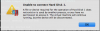
When trying to relaunch a virtual machine, get message saying "Unable to connect Hard Disk 1" with "A file or device required for the operation of Hard Disk 1 dose not exist or is used by another process, or you have no permission to access it. The virtual machine will continue running, but the device will be disconnected".
Found this Knowledge base article:
http://kb.parallels.com/en/116508
and followed directions to a tee but when getting to step 6, there was only 1 block of <Shot> .... </Shot> under the Snapshots block. See below from the original, "corrupted" DiskDescriptor file:
<?xml version='1.0' encoding='UTF-8'?>
<Parallels_disk_image Version="1.0">
<Disk_Parameters>
<Disk_size>134217728</Disk_size>
<Cylinders>262144</Cylinders>
<PhysicalSectorSize>4096</PhysicalSectorSize>
<Heads>16</Heads>
<Sectors>32</Sectors>
<Padding>0</Padding>
<Encryption>
<Engine>{00000000-0000-0000-0000-000000000000}</Engine>
<Data></Data>
</Encryption>
<UID>{0147a1f4-0acc-4d6c-93aa-4810cefa6bee}</UID>
<Name>Windows 7a-0 SSD</Name>
<Miscellaneous>
<CompatLevel>level2</CompatLevel>
<SuspendState>0</SuspendState>
<Bootable>1</Bootable>
<ChangeState>0</ChangeState>
<GuestToolsVersion>9.0.24251</GuestToolsVersion>
</Miscellaneous>
</Disk_Parameters>
<StorageData>
<Storage>
<Start>0</Start>
<End>134217728</End>
<Blocksize>2048</Blocksize>
<Image>
<GUID>{5fbaabe3-6958-40ff-92a7-860e329aab41}</GUID>
<Type>Compressed</Type>
<File>Windows 7a-0.hdd.0.{5fbaabe3-6958-40ff-92a7-860e329aab41}.hds</File>
</Image>
</Storage>
</StorageData>
<Snapshots>
<Shot>
<GUID>{5fbaabe3-6958-40ff-92a7-860e329aab41}</GUID>
<ParentGUID>{00000000-0000-0000-0000-000000000000}</ParentGUID>
</Shot>
</Snapshots>
</Parallels_disk_image>
Here is the log from the Parallels log
09-29 13:37:06.884 F /dimg:13085:3103/ Init: Can't open file 0x80021014
09-29 13:37:06.884 F /dimg:13085:3103/ Error initializing for the /Users/xxxuserxxx/Documents/Windows 7a.pvm/Windows 7a-0.hdd/Windows 7a-0.hdd.0.{5fbaabe3-6958-40ff-92a7-860e329aab41}.hds
09-29 13:37:06.884 F /dimg:13085:3103/ Error 0x80021014 when opening the disk. Releasing image.
09-29 13:37:06.884 F /vdisk:13085:3103/ Can't open uid {5fbaabe3-6958-40ff-92a7-860e329aab41} name /Users/xxxuserxxx/Documents/Windows 7a.pvm/Windows 7a-0.hdd/Windows 7a-0.hdd.0.{5fbaabe3-6958-40ff-92a7-860e329aab41}.hds Error 0x80021014
09-29 13:37:06.884 F /AbstractFile:13085:3103/ Error opening file /Users/xxxuserxxx/Documents/Windows 7a.pvm/Windows 7a-0.hdd/Windows 7a-0.hdd.0.{5fbaabe3-6958-40ff-92a7-860e329aab41}.hds with error 2 in handle pool
09-29 13:37:06.884 F /dimg:13085:3103/ OpenFile(/Users/xxxuserxxx/Documents/Windows 7a.pvm/Windows 7a-0.hdd/Windows 7a-0.hdd.0.{5fbaabe3-6958-40ff-92a7-860e329aab41}.hds) failed!: 2
Can anybody help fixing this? Any and all help would be greatly appreciated!
EC
Have Parallels 9 running Windows 7 on a OS X Yosemite 10.10.5 machine.
When trying to relaunch a virtual machine, get message saying "Unable to connect Hard Disk 1" with "A file or device required for the operation of Hard Disk 1 dose not exist or is used by another process, or you have no permission to access it. The virtual machine will continue running, but the device will be disconnected".
Found this Knowledge base article:
http://kb.parallels.com/en/116508
and followed directions to a tee but when getting to step 6, there was only 1 block of <Shot> .... </Shot> under the Snapshots block. See below from the original, "corrupted" DiskDescriptor file:
<?xml version='1.0' encoding='UTF-8'?>
<Parallels_disk_image Version="1.0">
<Disk_Parameters>
<Disk_size>134217728</Disk_size>
<Cylinders>262144</Cylinders>
<PhysicalSectorSize>4096</PhysicalSectorSize>
<Heads>16</Heads>
<Sectors>32</Sectors>
<Padding>0</Padding>
<Encryption>
<Engine>{00000000-0000-0000-0000-000000000000}</Engine>
<Data></Data>
</Encryption>
<UID>{0147a1f4-0acc-4d6c-93aa-4810cefa6bee}</UID>
<Name>Windows 7a-0 SSD</Name>
<Miscellaneous>
<CompatLevel>level2</CompatLevel>
<SuspendState>0</SuspendState>
<Bootable>1</Bootable>
<ChangeState>0</ChangeState>
<GuestToolsVersion>9.0.24251</GuestToolsVersion>
</Miscellaneous>
</Disk_Parameters>
<StorageData>
<Storage>
<Start>0</Start>
<End>134217728</End>
<Blocksize>2048</Blocksize>
<Image>
<GUID>{5fbaabe3-6958-40ff-92a7-860e329aab41}</GUID>
<Type>Compressed</Type>
<File>Windows 7a-0.hdd.0.{5fbaabe3-6958-40ff-92a7-860e329aab41}.hds</File>
</Image>
</Storage>
</StorageData>
<Snapshots>
<Shot>
<GUID>{5fbaabe3-6958-40ff-92a7-860e329aab41}</GUID>
<ParentGUID>{00000000-0000-0000-0000-000000000000}</ParentGUID>
</Shot>
</Snapshots>
</Parallels_disk_image>
Here is the log from the Parallels log
09-29 13:37:06.884 F /dimg:13085:3103/ Init: Can't open file 0x80021014
09-29 13:37:06.884 F /dimg:13085:3103/ Error initializing for the /Users/xxxuserxxx/Documents/Windows 7a.pvm/Windows 7a-0.hdd/Windows 7a-0.hdd.0.{5fbaabe3-6958-40ff-92a7-860e329aab41}.hds
09-29 13:37:06.884 F /dimg:13085:3103/ Error 0x80021014 when opening the disk. Releasing image.
09-29 13:37:06.884 F /vdisk:13085:3103/ Can't open uid {5fbaabe3-6958-40ff-92a7-860e329aab41} name /Users/xxxuserxxx/Documents/Windows 7a.pvm/Windows 7a-0.hdd/Windows 7a-0.hdd.0.{5fbaabe3-6958-40ff-92a7-860e329aab41}.hds Error 0x80021014
09-29 13:37:06.884 F /AbstractFile:13085:3103/ Error opening file /Users/xxxuserxxx/Documents/Windows 7a.pvm/Windows 7a-0.hdd/Windows 7a-0.hdd.0.{5fbaabe3-6958-40ff-92a7-860e329aab41}.hds with error 2 in handle pool
09-29 13:37:06.884 F /dimg:13085:3103/ OpenFile(/Users/xxxuserxxx/Documents/Windows 7a.pvm/Windows 7a-0.hdd/Windows 7a-0.hdd.0.{5fbaabe3-6958-40ff-92a7-860e329aab41}.hds) failed!: 2
Can anybody help fixing this? Any and all help would be greatly appreciated!
EC