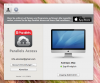
Hiding the startup screen

Hi Andreas,

Thank you for sharing the screenshot.

Please follow the steps as suggested below :
- In Parallels Access Go to Advanced(Erweitert) -> Disable "Start Parallels Access when I log into OS X"(Starten Sie Parallels Zugang, wenn ich mich in OS X).

Thanks,
Abdul
 
Hi,
thanks for the quick reply.
OK i tried to "just hide" this screen on startup, not do disable the hole application on startup. But i think after an update this screen does not appear anymore. So thanks for your help!
Thanks,
Andreas
 
Hi,
thanks for the quick reply.
OK i tried to "just hide" this screen on startup, not do disable the hole application on startup. But i think after an update this screen does not appear anymore. So thanks for your help!
Thanks,
Andreas

You're welcome Andreas. Glad that your issue was resolved.
 
Back
Top