
I am getting the prompt "Suspend BitLocker to update Secure Boot certificates." I looked at knowledge base article 131133, but when I type "BitLocker," I don't see the same options as in the included screenshot. The best match, Manage BitLocker, isn't shown, and I only see the option listed under Settings: "Device encryption settings." When I go into Privacy & security > Device encryption, I only have the option to turn off Device encryption. There is a Related item where I can click BitLocker drive encryption, and it opens the Microsoft Store, but when I search, I cannot find BitLocker as an option. 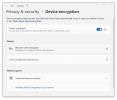
I don't want to change something and then make it harder to fix, or maybe it's not necessary since I don't have BitLocker enabled? But should I have enabled it?
I am using a 2021 MacBook Pro with an Apple M1 Pro Chip, macOS Tahoe 26.6.2, and Parallels Desktop 27 for Mac Pro Edition, version 27.0.1, Running Windows 11.
I don't want to change something and then make it harder to fix, or maybe it's not necessary since I don't have BitLocker enabled? But should I have enabled it?
I am using a 2021 MacBook Pro with an Apple M1 Pro Chip, macOS Tahoe 26.6.2, and Parallels Desktop 27 for Mac Pro Edition, version 27.0.1, Running Windows 11.
