Excel "Starting..." window never closes when opening .xlsx from macOS Finder

Cyberic

Junior Member
Hello,

I just updated PD 27 Mac to the latest version (PD 27.0.0 (58628), macOS Tahoe 26.5.2, M2 Max chip) and a new bug was introduced on my VM Windows 11 in Coherence mode.
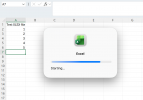
Whenever I open a .xlsx file, it starts Excel in the VM but now there is this new pop-up window "Excel Starting..." and it never closes even after Excel has started.
Initially I thought I would just ignore it but all the keyboard shortcuts no longer work so you can't just ignore it.
Of course, it does not happen when I first start Excel and open the file from Windows instead of double-click from Mac, but then it defeats the purpose of Coherence.

My setup:
  • Windows 11 virtual machine
  • Microsoft Excel for Windows
  • Excel is configured as the default application for .xlsx files in macOS
  • Windows applications are shared with macOS

Steps to reproduce:
  1. Make sure Excel is closed.
  2. Double-click an .xlsx file in macOS Finder.
  3. Parallels launches Excel and the workbook opens successfully.
  4. However, the Parallels “Excel — Starting…” window remains displayed indefinitely.
Excel itself is fully loaded and usable behind this window, but the “Starting…” window keeps the keyboard focus (even if pushed to the background). As a result, Excel keyboard shortcuts do not work correctly.

If Excel is already running before I double-click the .xlsx file, everything works normally and the issue does not occur. Launching Excel directly from inside the Windows 11 VM also works correctly.
The problem therefore seems related to the Parallels shared-application/helper process used to pass a document from macOS Finder to Excel for Windows, rather than to Excel itself.

Some additional notes to help identifying the fix or workaround:
  • Quitting Coherence or switching on/off does not help because the "Excel Starting..." pop-up remains open until you quit Excel
  • I tried disabling Sharing Windows Apps on Mac and re-enabling it again, didn't help
  • The same bug occurs on other Windows apps, for instance on Word (same behavior when opening .docx from Mac)
  • Reinstalled Parallels Tools multiple times, and rebooted both Mac and Windows VM also multiple times, no change to behavior
  • I sent technical report ID 528166103 with the data
I have attached a screenshot showing Excel running successfully behind the persistent “Starting…” window.

Has anyone else encountered this since the latest update? Is this a known issue with Shared Applications or the Coherence Helper?
Any workaround ?

Thank you.
Eric
 

Attachments
  • Capture d’écran 2026-08-26 à 12.02.21.png
    Capture d’écran 2026-08-26 à 12.02.21.png
    219.7 KB · Views: 1
Last edited:
Hello,

I just updated PD 27 Mac to the latest version (PD 27.0.0 (58628), macOS Tahoe 26.5.2, M2 Max chip) and a new bug was introduced on my VM Windows 11 in Coherence mode.
Whenever I open a .xlsx file, it starts Excel in the VM but now there is this new pop-up window "Excel Starting..." and it never closes even after Excel has started.
Initially I thought I would just ignore it but all the keyboard shortcuts no longer work so you can't just ignore it.
Of course, it does not happen when I first start Excel and open the file from Windows instead of double-click from Mac, but then it defeats the purpose of Coherence.

My setup:
  • Windows 11 virtual machine
  • Microsoft Excel for Windows
  • Excel is configured as the default application for .xlsx files in macOS
  • Windows applications are shared with macOS

Steps to reproduce:
  1. Make sure Excel is closed.
  2. Double-click an .xlsx file in macOS Finder.
  3. Parallels launches Excel and the workbook opens successfully.
  4. However, the Parallels “Excel — Starting…” window remains displayed indefinitely.
Excel itself is fully loaded and usable behind this window, but the “Starting…” window keeps the keyboard focus (even if pushed to the background). As a result, Excel keyboard shortcuts do not work correctly.

If Excel is already running before I double-click the .xlsx file, everything works normally and the issue does not occur. Launching Excel directly from inside the Windows 11 VM also works correctly.
The problem therefore seems related to the Parallels shared-application/helper process used to pass a document from macOS Finder to Excel for Windows, rather than to Excel itself.

Some additional notes to help identifying the fix or workaround:
  • Quitting Coherence or switching on/off does not help because the "Excel Starting..." pop-up remains open until you quit Excel
  • I tried disabling Sharing Windows Apps on Mac and re-enabling it again, didn't help
  • The same bug occurs on other Windows apps, for instance on Word (same behavior when opening .docx from Mac)
  • Reinstalled Parallels Tools multiple times, and rebooted both Mac and Windows VM also multiple times, no change to behavior
  • I sent technical report ID 528166103 with the data
I have attached a screenshot showing Excel running successfully behind the persistent “Starting…” window.

Has anyone else encountered this since the latest update? Is this a known issue with Shared Applications or the Coherence Helper?
Any workaround ?

Thank you.
Eric
hey @Cyberic, thanks a lot for reporting this! Our engineers identified the issue and the fix will be released soon. Thank you again! Anything else related to your Excel experience in Parallels Desktop you'd like to share? Happy to hear it!
 
Hello,

I just updated PD 27 Mac to the latest version (PD 27.0.0 (58628), macOS Tahoe 26.5.2, M2 Max chip) and a new bug was introduced on my VM Windows 11 in Coherence mode.
Whenever I open a .xlsx file, it starts Excel in the VM but now there is this new pop-up window "Excel Starting..." and it never closes even after Excel has started.
Initially I thought I would just ignore it but all the keyboard shortcuts no longer work so you can't just ignore it.
Of course, it does not happen when I first start Excel and open the file from Windows instead of double-click from Mac, but then it defeats the purpose of Coherence.

My setup:
  • Windows 11 virtual machine
  • Microsoft Excel for Windows
  • Excel is configured as the default application for .xlsx files in macOS
  • Windows applications are shared with macOS

Steps to reproduce:
  1. Make sure Excel is closed.
  2. Double-click an .xlsx file in macOS Finder.
  3. Parallels launches Excel and the workbook opens successfully.
  4. However, the Parallels “Excel — Starting…” window remains displayed indefinitely.
Excel itself is fully loaded and usable behind this window, but the “Starting…” window keeps the keyboard focus (even if pushed to the background). As a result, Excel keyboard shortcuts do not work correctly.

If Excel is already running before I double-click the .xlsx file, everything works normally and the issue does not occur. Launching Excel directly from inside the Windows 11 VM also works correctly.
The problem therefore seems related to the Parallels shared-application/helper process used to pass a document from macOS Finder to Excel for Windows, rather than to Excel itself.

Some additional notes to help identifying the fix or workaround:
  • Quitting Coherence or switching on/off does not help because the "Excel Starting..." pop-up remains open until you quit Excel
  • I tried disabling Sharing Windows Apps on Mac and re-enabling it again, didn't help
  • The same bug occurs on other Windows apps, for instance on Word (same behavior when opening .docx from Mac)
  • Reinstalled Parallels Tools multiple times, and rebooted both Mac and Windows VM also multiple times, no change to behavior
  • I sent technical report ID 528166103 with the data
I have attached a screenshot showing Excel running successfully behind the persistent “Starting…” window.

Has anyone else encountered this since the latest update? Is this a known issue with Shared Applications or the Coherence Helper?
Any workaround ?

Thank you.
Eric
Hello,

Thank you all for reporting this issue and for your patience.

A minor update for Parallels Desktop 27 has been released (27.0.1), in which this issue was fixed.

Refer to: https://kb.parallels.com/en/131168

To update:

a) Right-Click on the Parallels Desktop Icon > Check for updates

b) You can also find the direct download link for Parallels Desktop 27.0.1 here:

Regards,
Parallels Team
 
Back
Top