You are using an out of date browser. It may not display this or other websites correctly.
You should upgrade or use an alternative browser.
You should upgrade or use an alternative browser.
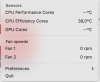
CPU Temperature not showing CPU performance and GPU temperature
- Thread starter IvanN9
- Start date
Hey MichaelI6, sounds like you're running into the same problem as the original poster. Hopefully, someone from support will chime in soon with a fix, or at least acknowledge they're working on it. Since you're on an M4 MacBook Pro too, it might be a specific issue with that hardware. Fingers crossed they get it sorted out quickly!Geometry DashI have the same issue. Is someone going to fix this? I have an MacBook Pro M4
Thanks, Hansb8, I've been following this issue closely and am genuinely curious--do the Parallels team members actively monitor these forums? If they do, it's puzzling why no one has stepped in to acknowledge or provide an update regarding the temperature reporting bug affecting MacBook Pro M4 users. This model has been out for some time, and accurate temperature reporting is fundamental, especially for those of us relying on Parallels for performance-sensitive tasks.
A product's value is significantly shaped by the responsiveness and clarity of the support provided. Transparent communication about known issues and timelines for fixes goes a long way toward maintaining trust and loyalty among users. I'd sincerely appreciate if someone from the Parallels team could address this ongoing concern directly and provide us with some insight or an estimated timeline for resolution.
A product's value is significantly shaped by the responsiveness and clarity of the support provided. Transparent communication about known issues and timelines for fixes goes a long way toward maintaining trust and loyalty among users. I'd sincerely appreciate if someone from the Parallels team could address this ongoing concern directly and provide us with some insight or an estimated timeline for resolution.
I meant to write that it wasn't a Toolbox add or something, just the Windows update that caused the machine to go hot. Now, I can't use the Parallels at all.I have the same issue with the updates from July 2025 causing the MacBook Air (M4) to be hot.
Keshav Dosieah
Staff member
Hello Ivan,I recently installed Parallels Toolbox for Mac and have noticed on the CPU Temperature tool, application displays data only for the efficiency cores. No current temperature on CPU performance cores and GPU cores.
MacBook Pro M4 Pro
View attachment 23227
We have created a ticket for you and have reached out to you to collect further information to investigate this issue further.
Regards,
Parallels Team
@Keshav Dosieah do you have any update from DEV team regarding a fix for this issue?