Hello,
I'd like to ask a question about this weird setting that I can't understand how it works.
What I need to do is with Parallel RAS, in Windows 10/11, through the client to:
Connect and being asked username and password, having the ability to choose to save the password or not.
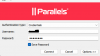
Starting here (new first-time connection):
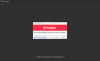
choosing to tick 'Save Password'
Once logged in, I logout.
I re-establish the same connection, however, thats what I get:
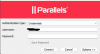
Even though I decided to save the password, through the first-time connection, reconnecting, as shown, it still asks me to insert the password, and the possibility to check 'Save Password' is greyed out. So something isnt working...
Here's my Parallel RAS server policies:
1. Primary Connection
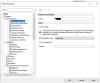
'Save Password' here, is disabled, because since reading this:

I did this test:
If I login the first time connection without checking the save password option and right after I check this 'Save Password' option, doing the step logout-reconnect, it will automatically login without asking the password (I guess thats what it means by forced, in the article)
2. Control Settings > Credentials
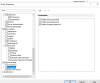
reading this article,

If I do not check the 'Prohibit saving password', I should be able to see the checkbox at the connection that asks me to save. I dont have that checkbox option to save the password in the second following reconnection.
What I am expecting is:
Primary connection > Save Password OFF (because even the people that decided to not save the password, will have it saved forced)
Control settings > Credentials > Prohibit saving username AND password OFF
I am able to connect, choose to save the password or not. And if I do, I expect that in the next logins I wont be asked to insert it.
However, if I don't choose to save, I will have to do the default route, inserting the password manually, but it will still asks me to save or not, in case in future I do decide eventually to save it.
However in this scenario with these settings (OFF, OFF): When I choose to save the password in the first-time connection, the following ones will still asks me to insert it, and the option to save is greyed out (which should be when the option Prohibit saving password is ON, which is not my case)
Can someone take a look into this or help?
Thanks
Ivan
I'd like to ask a question about this weird setting that I can't understand how it works.
What I need to do is with Parallel RAS, in Windows 10/11, through the client to:
Connect and being asked username and password, having the ability to choose to save the password or not.
Starting here (new first-time connection):
choosing to tick 'Save Password'
Once logged in, I logout.
I re-establish the same connection, however, thats what I get:
Even though I decided to save the password, through the first-time connection, reconnecting, as shown, it still asks me to insert the password, and the possibility to check 'Save Password' is greyed out. So something isnt working...
Here's my Parallel RAS server policies:
1. Primary Connection
'Save Password' here, is disabled, because since reading this:
I did this test:
If I login the first time connection without checking the save password option and right after I check this 'Save Password' option, doing the step logout-reconnect, it will automatically login without asking the password (I guess thats what it means by forced, in the article)
2. Control Settings > Credentials
reading this article,
If I do not check the 'Prohibit saving password', I should be able to see the checkbox at the connection that asks me to save. I dont have that checkbox option to save the password in the second following reconnection.
What I am expecting is:
Primary connection > Save Password OFF (because even the people that decided to not save the password, will have it saved forced)
Control settings > Credentials > Prohibit saving username AND password OFF
I am able to connect, choose to save the password or not. And if I do, I expect that in the next logins I wont be asked to insert it.
However, if I don't choose to save, I will have to do the default route, inserting the password manually, but it will still asks me to save or not, in case in future I do decide eventually to save it.
However in this scenario with these settings (OFF, OFF): When I choose to save the password in the first-time connection, the following ones will still asks me to insert it, and the option to save is greyed out (which should be when the option Prohibit saving password is ON, which is not my case)
Can someone take a look into this or help?
Thanks
Ivan