Install the app
How to install the app on iOS
Follow along with the video below to see how to install our site as a web app on your home screen.
Note: This feature may not be available in some browsers.
You are using an out of date browser. It may not display this or other websites correctly.
You should upgrade or use an alternative browser.
You should upgrade or use an alternative browser.
MetaTrader 5 Running on latest version of Parallels and Windows 11 running on M1 Pro
- Thread starter RodrigoM13
- Start date

If you are facing an issue with Metatrader 5 , for us to further investigate the technical issue, kindly provide us with the following information:Not working here. Brand new M2 MacBook Air, brand new Parallels. Bought the mac specifically to run MT5.
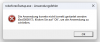
0xc0000017 error when trying to run the installer.
Works fine in Parallels on M1.
1. Screenshot of error message you are receiving.
2. Collect a technical report (right-click Parallels icon in Dock > Help > Send technical data > check "Attach screenshots..." > press Send Report) and provide us with the report's 9-digit ID in reply to this post.
Thanks
VladyslavC
Bit poster
I have exactly the same. And its interesting, that at one VM I have a fully working MT5, which I installed about month ago. But now something changed, and I can install MT 5 anymore, even on new clean VMs. I have exact error 0xc0000017.
Same error 0xc0000017 with M1 MacBook Pro 14''. I can't understand how it works for some people and does not work for others on the exact same laptops. Created a support ticket, went back and forth with them and apparently Parallels does not have a solution. Will be looking for other VM solutions.
VladyslavC
Bit poster
Any updates? This is one more report for you 423237434. I hope it helps to resolve it quickly as possible.
I am getting the same problem installing MT5 on Parallers 18 on MacBook Air M1. On March 3, I installed MT5 without any problems. I reinstalled the system on April 9 and it failed to install. I was getting error 0xc0000017. Maybe there was an update at the time and the solution would be the original version of Parallers or Win 11 from early March?
Hello,
As a possible solution, we recommended you to download the software using below link and it installed correctly:
https://download.mql5.com/cdn/web/metaquotes.software.corp/mt4/mt4setup.exe
Thank you.
As a possible solution, we recommended you to download the software using below link and it installed correctly:
https://download.mql5.com/cdn/web/metaquotes.software.corp/mt4/mt4setup.exe
Thank you.
VladyslavC
Bit poster
I am getting the same problem installing MT5 on Parallers 18 on MacBook Air M1. On March 3, I installed MT5 without any problems. I reinstalled the system on April 9 and it failed to install. I was getting error 0xc0000017. Maybe there was an update at the time and the solution would be the original version of Parallers or Win 11 from early March?
100%, I also in March installed MT5 with no problems. This issue started at the beginning on April. I still have one VM running MT5, wich I installed in March.
Hello,
As a possible solution, we recommended you to download the software using below link and it installed correctly:
https://download.mql5.com/cdn/web/metaquotes.software.corp/mt4/mt4setup.exe
Thank you.
But it is MT4, not MT5. By the ways, its installation starts with no error on machine, where mt5 installation crashes.

Maxim Rasulov
Staff member
Hello.
Thank you for noting the changes in the installer behaviour, as it moved from March to April. Please note, however, that the latest update to Parallels Desktop was released in February.
We have conducted internal testing, and indeed it appears that most recent MetaTrader installers, released in April, currently encounter a 0xc0000017 when trying to run the installer.
Considering that the MT5 installers released in March can successfully install on newly created virtual machines, the issue is likely caused by the changes in the installer itself.
For now, as a possible workaround, you can try using the previously released March installer for MetaTrader 5, that we have uploaded, to check if you can install it, by downloading it from the following link:
https://fe.parallels.com/7ed5e7078e75321483514d2396af387a/
Note: Installer was downloaded from the official website, build 3661 March 25th.
The software should be able to be updated to the latest April version after the installation: Open MetaTrader 5 -> in the top bar, click "Help" -> "Check Desktop Updates" -> "Latest Release version".
Note: The update can take a few minutes to download and complete.
Let us know if you can install it using the March-released installer.
Thank you.
Thank you for noting the changes in the installer behaviour, as it moved from March to April. Please note, however, that the latest update to Parallels Desktop was released in February.
We have conducted internal testing, and indeed it appears that most recent MetaTrader installers, released in April, currently encounter a 0xc0000017 when trying to run the installer.
Considering that the MT5 installers released in March can successfully install on newly created virtual machines, the issue is likely caused by the changes in the installer itself.
For now, as a possible workaround, you can try using the previously released March installer for MetaTrader 5, that we have uploaded, to check if you can install it, by downloading it from the following link:
https://fe.parallels.com/7ed5e7078e75321483514d2396af387a/
Note: Installer was downloaded from the official website, build 3661 March 25th.
The software should be able to be updated to the latest April version after the installation: Open MetaTrader 5 -> in the top bar, click "Help" -> "Check Desktop Updates" -> "Latest Release version".
Note: The update can take a few minutes to download and complete.
Let us know if you can install it using the March-released installer.
Thank you.
VladyslavC
Bit poster
Hello.
Thank you for noting the changes in the installer behaviour, as it moved from March to April. Please note, however, that the latest update to Parallels Desktop was released in February.
Yes, it wokrs!!! You installer works on the same machine, where official one does not. I tried to to update it, it says that you are already use the latest version. But where did you get this 3661 build? I cant find it there. Anyway, thank you for investigating into the issue. I am just interested what is the problem, because many broker specific builds using 3660 and all of them are failing now.
Maxim Rasulov
Staff member
Hello.
Glad it could help.
Regarding the installer, it's actually the official one, just downloaded back in March when it was still current version, which is why I mentioned that it's from their own website.
In the case where some versions of the same software can work, and others do not, it's most likely related to the changes in the software itself, or alternatively, sometimes operating system updates could also influence software behaviour, so it may or may not change with future Windows updates.
Unfortunately, as Windows event logs do not seem to contain any useful information regarding the crash, and the error 0xc0000017 is too broad, there is currently no other information regarding the newest installers, however updating the software itself after installation should function as intended.
Glad it could help.
Regarding the installer, it's actually the official one, just downloaded back in March when it was still current version, which is why I mentioned that it's from their own website.
In the case where some versions of the same software can work, and others do not, it's most likely related to the changes in the software itself, or alternatively, sometimes operating system updates could also influence software behaviour, so it may or may not change with future Windows updates.
Unfortunately, as Windows event logs do not seem to contain any useful information regarding the crash, and the error 0xc0000017 is too broad, there is currently no other information regarding the newest installers, however updating the software itself after installation should function as intended.
VladyslavC
Bit poster
Ok, the only thing is that 3660 is the newest official build at this time. And 3661 is the one, that solves the problem.
Hello,
Thank you for the following link. Everything works correctly.
Problem solved
Thank you for the following link. Everything works correctly.
Problem solved
Hello.
Thank you for noting the changes in the installer behaviour, as it moved from March to April. Please note, however, that the latest update to Parallels Desktop was released in February.
We have conducted internal testing, and indeed it appears that most recent MetaTrader installers, released in April, currently encounter a 0xc0000017 when trying to run the installer.
Considering that the MT5 installers released in March can successfully install on newly created virtual machines, the issue is likely caused by the changes in the installer itself.
For now, as a possible workaround, you can try using the previously released March installer for MetaTrader 5, that we have uploaded, to check if you can install it, by downloading it from the following link:
https://fe.parallels.com/7ed5e7078e75321483514d2396af387a/
Note: Installer was downloaded from the official website, build 3661 March 25th.
The software should be able to be updated to the latest April version after the installation: Open MetaTrader 5 -> in the top bar, click "Help" -> "Check Desktop Updates" -> "Latest Release version".
Note: The update can take a few minutes to download and complete.
Let us know if you can install it using the March-released installer.
Thank you.
Hello,Hello.
Thank you for noting the changes in the installer behaviour, as it moved from March to April. Please note, however, that the latest update to Parallels Desktop was released in February.
We have conducted internal testing, and indeed it appears that most recent MetaTrader installers, released in April, currently encounter a 0xc0000017 when trying to run the installer.
Considering that the MT5 installers released in March can successfully install on newly created virtual machines, the issue is likely caused by the changes in the installer itself.
For now, as a possible workaround, you can try using the previously released March installer for MetaTrader 5, that we have uploaded, to check if you can install it, by downloading it from the following link:
https://fe.parallels.com/7ed5e7078e75321483514d2396af387a/
Note: Installer was downloaded from the official website, build 3661 March 25th.
The software should be able to be updated to the latest April version after the installation: Open MetaTrader 5 -> in the top bar, click "Help" -> "Check Desktop Updates" -> "Latest Release version".
Note: The update can take a few minutes to download and complete.
Let us know if you can install it using the March-released installer.
Thank you.
Thank you for the following link. Everything works correctly.
Problem solved
Hello.
Thank you for noting the changes in the installer behaviour, as it moved from March to April. Please note, however, that the latest update to Parallels Desktop was released in February.
We have conducted internal testing, and indeed it appears that most recent MetaTrader installers, released in April, currently encounter a 0xc0000017 when trying to run the installer.
Considering that the MT5 installers released in March can successfully install on newly created virtual machines, the issue is likely caused by the changes in the installer itself.
For now, as a possible workaround, you can try using the previously released March installer for MetaTrader 5, that we have uploaded, to check if you can install it, by downloading it from the following link:
https://fe.parallels.com/7ed5e7078e75321483514d2396af387a/
Note: Installer was downloaded from the official website, build 3661 March 25th.
The software should be able to be updated to the latest April version after the installation: Open MetaTrader 5 -> in the top bar, click "Help" -> "Check Desktop Updates" -> "Latest Release version".
Note: The update can take a few minutes to download and complete.
Let us know if you can install it using the March-released installer.
Thank you.
It works! Thank you guys for not leaving us behind!